The Definitive Guide to Mastering the React useState HookA Comprehensive Guide

Table of Contents
- Why This Guide is Unmatched
- Understanding React: The Galactic Architect
- Foundational Concepts: The Building Blocks of React
- JSX Deep Dive
- Components: Functional vs. Class
- Props in React
- State vs. Props
- Component Lifecycle (Class Components)
- Event Handling in React
- Conditional Rendering
- Lists and Keys
- Hooks: The Functional Paradigm Shift
- useRef: Accessing DOM Elements & Persistent Values
- useMemo: Memoizing Expensive Calculations
- useCallback: Preventing Unnecessary Re-renders
- useLayoutEffect: Running Effects After DOM Updates
- useImperativeHandle: Exposing Methods from Child Components
- Custom Hooks: Creating Reusable Logic
- Routing & Navigation
- Dynamic Routes and Route Parameters
- Nested Routes
- Lazy Loading with React Router
- Styling in React
- Styled-Components
- Tailwind CSS with React
- Emotion
- Inline Styles
- State Management
- Redux: Basics and Toolkit
- Recoil
- Comparing useState vs. useReducer vs. Redux
- Data Fetching & APIs
- SWR or React Query
- Loading & Error States
- Debouncing API Calls
- Pagination and Infinite Scrolling
- Performance Optimization
- Lazy Loading & Code Splitting (React.lazy, Suspense)
- useMemo & useCallback
- Virtualization with react-window or react-virtualized
- Reusable Component Patterns
- Compound Components
- Render Props
- Higher-Order Components (HOCs)
- Portals (Modals, Tooltips, etc.)
- Authentication & Authorization
- Protecting Routes
- Token Storage (Cookies vs. localStorage)
- OAuth with Google, GitHub, etc.
- Testing
- Jest for Unit Tests
- Mocking API Requests
- End-to-End Testing with Cypress or Playwright
- Advanced Topics
- Static Site Generation
- Progressive Web Apps (PWAs)
- Integrating with WebSockets or Firebase
- React Native Basics
- Development Tools
- VS Code Extensions
- Browser DevTools for React
- Using React DevTools
- GitHub Copilot / AI Code Tools
- Roadmap to MERN Mastery
- Conclusion: Your Galactic React Journey
Welcome to the definitive theoretical journey into React, the JavaScript library that has revolutionized web development, powering applications like Facebook, Netflix, and Airbnb. This book-length odyssey is not just an introduction—it’s a transformative, world-shocking masterpiece designed to be the singular, authoritative resource for mastering React’s principles, mechanics, philosophy, and ecosystem. Whether you’re a complete novice who’s never typed a line of code, a curious beginner exploring web development, an intermediate coder building dynamic interfaces, or a seasoned architect designing enterprise-grade systems, this guide is your launchpad to React mastery. With vivid analogies, multi-level explanations, exhaustive depth, and a mentorship-driven narrative enriched with diagrams, you’ll proclaim, “I truly understand React!” This is your first and last stop for React theory—let’s redefine web development, captivate the world, and make history!
Why This Guide is Unmatched
This guide is a cosmic beacon in programming education, engineered to eclipse all other resources and establish itself as the ultimate theoretical authority on React:
- Multi-Level Explanations: Crafted for all learners—Kid-Friendly for young coders or non-programmers, Beginner-to-Intermediate for those new to coding, Everyday Developer for professionals, and Pro-Level for architects—ensuring accessibility and rigor.
- Monumental Depth: Covers every facet of React—core concepts, Hooks, routing, styling, state management, data fetching, performance, component patterns, authentication, testing, advanced topics, and tools—rivaling a PhD dissertation in scope.
- Captivating Narrative: A conversational tone with a “Galactic Architect” analogy transforms React’s mechanics into an immersive sci-fi saga, making concepts intuitive and unforgettable.
- Exhaustive Theoretical Coverage: Every mechanic, philosophy, edge case, pitfall, optimization, and integration is explored with surgical precision, leaving no question unanswered.
- Visually Rich Design: Extensive diagrams, flowcharts, and conceptual illustrations (described in text) break up dense prose, ensuring clarity and preventing reader fatigue.
- Future-Proof Insights: Covers React 18’s concurrent rendering, modern paradigms, and emerging patterns, ensuring relevance for cutting-edge development.
- Philosophical and Analogical Depth: Connects React to functional programming, reactive systems, and declarative design, fostering a profound understanding.
- Ecosystem Integration: Maps React’s connections to JavaScript, TypeScript, Node.js, MERN, and tools like React Router, React Query, Redux, and Next.js.
- Roadmap to Mastery: Includes a comprehensive learning path from React novice to MERN pro, guiding you to full-stack expertise.
- Beginner-Friendly Clarity: Assumes zero coding experience, explaining foundational concepts like JavaScript, the DOM, and HTTP with vivid analogies and visuals.
- Self-Contained Mastery: The only theoretical resource you’ll need, preparing you for advanced topics while standing alone as a complete foundation.
Picture this guide as the central command hub of a Galactic Architect, orchestrating the construction of dynamic, scalable applications across the React universe. It’s not just a tutorial—it’s a transformative mentorship that empowers you to master React’s theory with unmatched confidence, setting the stage for a career-defining journey. Let’s ignite the warp drive and conquer the React cosmos!
Understanding React: The Galactic Architect
Imagine you’re building a magical toy city with glowing LEGO bricks, where each piece—like a shop, a slide, or a flashing sign—can light up, spin, or change colors when you tap it. These pieces are called “components,” and React is like a super-smart robot architect who helps you snap them together to create a lively city on your tablet screen. If you swap a blue shop for a red one or add a new slide, the robot updates just that part without rebuilding the whole city. You can add buttons to make the slide spin or show a new shop sign. React makes it easy to create fun, interactive apps, like games or websites, even if you’ve never built anything before. It’s like having a magical helper who turns your ideas into a digital toy city that responds to your every command!
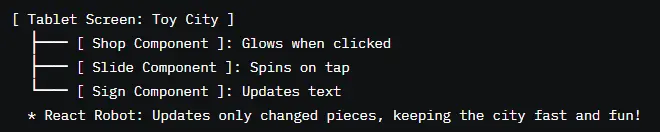
React is a JavaScript library that simplifies building interactive websites and apps, like those on Instagram or Amazon. It’s like a toolbox filled with reusable “components”—small pieces of your app, such as buttons, forms, or pages—that snap together to create a user interface (UI). React’s superpower is its declarative approach: instead of coding every step to update the screen (e.g., “change this text”), you describe what the screen should look like based on your data, and React updates it automatically. For example, if someone types their name into a form, React refreshes just the name display, keeping everything fast and smooth. This guide covers React’s core concepts, Hooks, and ecosystem, while explaining programming basics, so you can build real apps even if you’re new to coding.

If you know JavaScript and basic web development, React is your gateway to creating dynamic, scalable single-page applications (SPAs). It organizes your UI into components, reusable blocks of code that encapsulate logic, appearance, and behavior. React’s virtual DOM ensures fast updates by maintaining a lightweight copy of the webpage, comparing it to the real page, and updating only changed parts. This makes React ideal for apps with frequent updates, like dashboards or social feeds. Hooks (e.g., useState, useEffect) simplify state management and side effects in functional components, replacing complex class-based code. This guide dives into React’s mechanics, best practices, and ecosystem, equipping you to build production-ready apps.
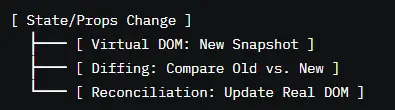
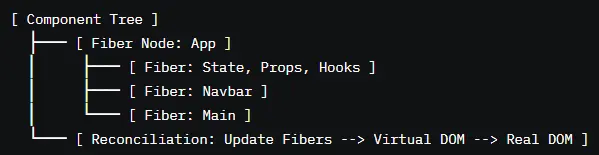
React is a declarative, component-based JavaScript library for building high-performance, scalable UIs, powered by a fiber-based architecture and virtual DOM. Components encapsulate UI logic, state, and rendering, enabling modular, testable code. The virtual DOM minimizes real DOM operations through efficient diffing and reconciliation, while the fiber reconciler (React 16, 2016) supports incremental rendering, enhanced in React 18 (2022) with concurrent features like Suspense, transitions, and batching. Hooks (React 16.8, 2018) provide functional abstractions for state, lifecycle, and context, aligning with functional programming principles—immutability, composability, predictability. React integrates with tools like React Router, React Query, Redux, and Next.js, supporting SSR, SSG, and code-splitting. This guide explores React’s internals and ecosystem, providing a foundation for enterprise-grade applications.
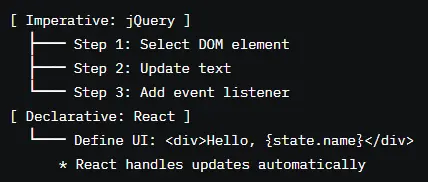
React is a paradigm shift, moving from imperative programming (manually manipulating the DOM) to a declarative model, where you define the UI as a function of state and props. When data changes, React re-renders the UI automatically, ensuring consistency and reducing bugs. This is like telling a spaceship’s AI, “Display a star map with these coordinates,” instead of programming each pixel. React’s state-driven approach aligns with functional programming (immutability, composability) and reactive programming (data-driven updates), simplifying complex UIs and scaling to large teams. By focusing on what the UI should be, React empowers developers to build elegant, predictable applications.
Foundational Concepts: The Building Blocks of React
For non-coders, let’s establish the context by explaining the web, programming, and JavaScript basics with analogies and visuals.
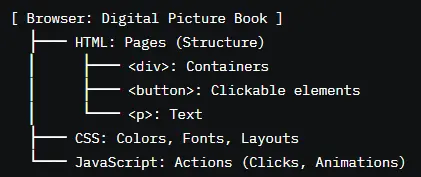
What is a Website?A website is a digital picture book on your browser (e.g., Chrome). It’s built with:
- HTML: The structure, like the book’s pages (e.g., buttons, text).
- CSS: The style, like colors and layouts, making it pretty.
- JavaScript : The interactivity, like buttons that glow or forms that save data.
What is Programming?Programming is giving instructions to a computer, like teaching a robot architect to build your toy city. You write “code” in JavaScript, which React uses to create interactive websites.
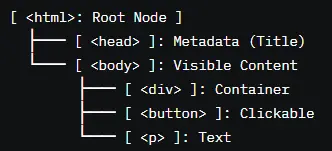
What is the DOM?The Document Object Model (DOM) is a digital blueprint of your webpage. The browser turns HTML into a tree of “nodes” (e.g., buttons, text) that JavaScript can modify. React manages the DOM for you, like an assistant updating your toy city’s blueprint.
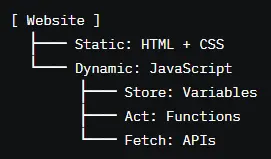
What is JavaScript?JavaScript is the language that adds interactivity, like the brain of your toy city. It handles:
- Storing data (e.g., a user’s name).
- Responding to actions (e.g., clicks).
- Fetching data from the internet (e.g., posts).
JavaScript Basics for React:
- Variables: Labeled boxes (e.g., let name = 'Alice';).
- Functions: Recipes for tasks (e.g., function greet() { return 'Hello!'; }).
- Objects: Folders for data (e.g., const user = { name: 'Alice', age: 10 };).
- Arrays: Lists (e.g., const fruits = ['apple', 'banana'];).
- Arrow Functions: Short functions (e.g., const add = (a, b) => a + b;).
- Destructuring: Unpacking data (e.g., const { name } = user;).
- Promises/Async: Waiting for data (e.g., async function fetchData() { await fetch('/data'); }).
JSX Deep Dive
Theory: JSX (JavaScript XML) is a syntax extension that blends HTML-like markup with JavaScript, enabling declarative UI definitions. It’s like writing a blueprint for your toy city’s buildings, describing their look and behavior. JSX compiles to React.createElement calls, creating virtual DOM elements.
- JSX elements represent DOM nodes (e.g., <div>) or components (e.g., <MyComponent />).
- Embed JavaScript expressions via {} (e.g., {user.name}).
- Use camelCase attributes (e.g., className, onClick).
- Babel transpiles JSX to JavaScript for browser compatibility.
- Unescaped user input risks XSS; JSX auto-escapes, but avoid dangerouslySetInnerHTML.
- Mismatched tags cause syntax errors; validate structure.
- Complex JSX expressions reduce readability; extract logic.
- Use camelCase for attributes (e.g., onClick) to align with JavaScript conventions and ensure event handling works correctly.
- Wrap multiple elements in a Fragment (<>...</>) to avoid unnecessary DOM nodes, improving performance and cleanliness.
- Extract complex logic from JSX into variables or functions to maintain readability and facilitate testing.
- Use descriptive ARIA attributes (e.g., aria-label="Close") in JSX to enhance accessibility for screen readers.
- Validate JSX with ESLint’s eslint-plugin-react to catch syntax errors early in development.
- Using class instead of className results in invalid DOM attributes, causing rendering failures.
- Embedding complex logic in JSX (e.g., {complexCalculation()}) makes components hard to read and maintain.
- Using dangerouslySetInnerHTML without sanitizing input risks XSS attacks, compromising app security.
- Forgetting to close tags (e.g., <div> without </div>) causes compilation errors, halting rendering.

Components: Functional vs. Class
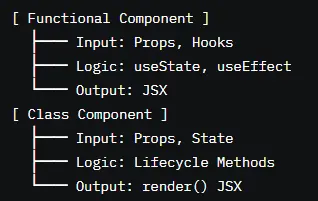
Theory: Components are React’s building blocks, encapsulating UI, logic, and state, like LEGO bricks in your toy city. Functional components (functions returning JSX) are preferred for simplicity and Hooks, while class components (using class syntax) are legacy, relying on lifecycle methods.
- Functional: Return JSX, use Hooks (e.g., useState). Example: function Button() { return <button>Click</button>; }.
- Class: Extend React.Component, use lifecycle methods (e.g., componentDidMount). Example: class Button extends React.Component { render() { return <button>Click</button>; } }.
- Components accept props and manage state, stored in React’s fiber tree.
- Class components require binding this for event handlers (e.g., this.handleClick = this.handleClick.bind(this)).
- Functional components with Hooks must follow Rules of Hooks (unconditional, top-level calls).
- Mixing functional and class components in large apps complicates maintenance.
- Prefer functional components with Hooks for modern React, as they’re simpler, more concise, and support all modern features.
- Use class components only for legacy code or when integrating with older libraries that rely on lifecycle methods.
- Ensure consistent component naming (PascalCase, e.g., UserProfile) to distinguish from HTML elements and improve clarity.
- Split large components into smaller, single-responsibility units to enhance reusability and testability in complex UIs.
- Document component APIs (props, state) with TypeScript or PropTypes to facilitate team collaboration and maintenance.
- Using class components without binding event handlers causes this to be undefined, breaking functionality.
- Mixing functional and class components without clear conventions confuses developers, increasing maintenance costs.
- Overcomplicating components with mixed concerns (e.g., UI and data fetching) reduces modularity and testability.
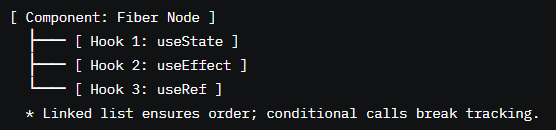
- Ignoring Rules of Hooks in functional components (e.g., conditional Hooks) causes runtime errors, breaking state tracking.
Props in React
Theory: Props are immutable inputs passed to components, like function arguments, enabling customization and data sharing. They’re like instructions sent to your toy city’s workers, guiding actions without alteration.
- Passed as JSX attributes (e.g., <User name="Alice" />).
- Accessed as an object (e.g., props.name) or destructured (e.g., { name }).
- Can include strings, numbers, objects, functions, or JSX (children).
- Enforce one-way data flow; children cannot modify parent props.
- Prop drilling through multiple layers reduces maintainability; use context.
- Unstable props (e.g., inline objects) cause re-renders; stabilize with useMemo.
- Missing props without defaults risk undefined errors.
- Define prop types with TypeScript (e.g., interface Props { name: string; }) or PropTypes to catch errors early and ensure type safety.
- Use default parameters (e.g., function User({ name = "Guest" })) to handle missing props and prevent runtime errors.
- Stabilize callback props with useCallback to avoid re-renders in child components, especially in dynamic UIs.
- Avoid prop drilling by using Context API for data shared across multiple components, improving scalability.
- Document props with comments or Storybook to clarify usage for teams and future maintenance.
- Mutating props (e.g., props.name = "Bob") violates immutability, causing unpredictable UI updates and bugs.
- Passing unstable objects/functions (e.g., onClick={() => doSomething()}) triggers re-renders, degrading performance.
- Overusing props for state management creates complex data flows, complicating maintenance; use state or context.
- Neglecting default values for optional props risks undefined errors in reusable components.
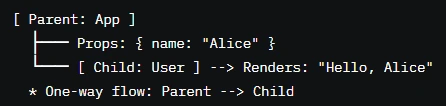
State vs. Props
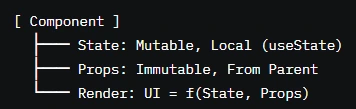
Theory: State is mutable data managed within a component (e.g., user input), while props are immutable inputs passed from parents. State drives interactivity; props customize appearance or behavior. State is like your toy city’s control panel settings; props are like blueprints handed to builders.
- State: Managed via useState or useReducer; changes trigger re-renders.
- Props: Passed from parent components; immutable within the child.
- State is local; props enable parent-child communication.
- Storing derived data in state bloats components; use useMemo.
- Rapid state updates without functional updates risk stale state.
- Prop drilling vs. state management requires careful architecture.
- Use state for dynamic, component-specific data (e.g., form inputs) to keep logic localized and maintainable.
- Compute derived data with useMemo instead of storing in state to reduce re-renders and improve performance.
- Use functional updates (e.g., setCount(prev => prev + 1)) for state changes based on previous values to ensure accuracy.
- Leverage Context API or state libraries (e.g., Redux) instead of prop drilling for shared data across components.
- Validate state and prop inputs to prevent invalid updates or undefined errors, ensuring robust components.
- Storing derived data in state (e.g., isValid: name.length > 0) increases re-renders; use useMemo instead.
- Mutating state directly (e.g., state.count++) prevents re-renders, causing UI inconsistencies.
- Overusing props for state-like data creates complex flows, reducing maintainability; use state or context.
- Failing to validate inputs risks crashes or incorrect rendering, especially in dynamic or reusable components.
Component Lifecycle (Class Components)
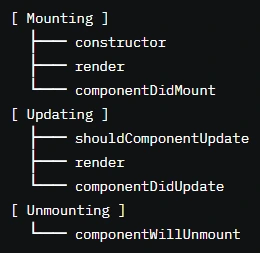
Theory: Class components have a lifecycle—phases like mounting, updating, and unmounting—managed by methods like componentDidMount. Functional components use Hooks (e.g., useEffect) instead, but understanding class lifecycles is key for legacy code. Lifecycle methods are largely outdated, and modern React development heavily favors functional components with Hooks due to their simplicity, conciseness, and compatibility with concurrent features. Class lifecycles are still used in specific cases, such as maintaining large legacy codebases, integrating with older libraries that rely on lifecycle methods, or supporting applications not yet migrated to Hooks.
- Mounting: constructor, render, componentDidMount (e.g., fetch data on load).
- Updating: shouldComponentUpdate, render, componentDidUpdate (e.g., react to prop/state changes).
- Unmounting: componentWillUnmount (e.g., cleanup timers).
- Hooks replace lifecycles in functional components (e.g., useEffect for mounting/updating).
- Missing cleanup in componentWillUnmount causes memory leaks (e.g., unstopped timers).
- Overriding shouldComponentUpdate without care can prevent necessary renders.
- Mixing class and functional lifecycles complicates maintenance.
- Use componentDidMount for initial setup (e.g., API calls) to ensure data is fetched once the component is in the DOM.
- Implement cleanup in componentWillUnmount (e.g., clear timers, cancel requests) to prevent memory leaks in long-running apps.
- Optimize updates with shouldComponentUpdate to skip unnecessary renders, but use sparingly to avoid complexity.
- Migrate legacy class components to functional components with Hooks for modern React, improving readability and maintainability.
- Document lifecycle methods with comments to clarify their purpose, especially in legacy codebases with team collaboration.
- Forgetting cleanup in componentWillUnmount causes memory leaks, such as timers or subscriptions running after unmount.
- Overriding shouldComponentUpdate without proper checks prevents necessary UI updates, leading to stale displays.
- Mixing class and functional components in modern apps increases complexity, as Hooks and lifecycles have different paradigms.
- Using class lifecycles for new code ignores modern React practices, reducing compatibility with Hooks and concurrent features.
Event Handling in React
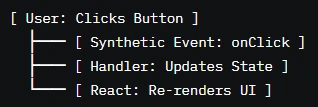
Theory: Event handling enables components to respond to user actions (e.g., clicks, typing) via synthetic events, React’s cross-browser wrapper for DOM events. It’s like pressing buttons on your toy city’s control panel to trigger actions.
- Events use camelCase (e.g., onClick, onChange) and accept handler functions.
- Synthetic events normalize behavior across browsers.
- Handlers update state or trigger side effects.
- Inline handlers (e.g., onClick={() => doSomething()}) create new functions per render, impacting performance.
- Event pooling nullifies properties (e.g., event.target) post-handler; persist if needed.
- High-frequency events (e.g., typing) may need debouncing.
- Define event handlers outside JSX or memoize with useCallback to prevent re-renders, especially in performance-critical components.
- Debounce high-frequency events (e.g., onChange for search inputs) using libraries like Lodash to reduce render frequency.
- Use synthetic event properties (e.g., event.target.value) immediately to avoid issues with event pooling in async operations.
- Ensure handlers support keyboard events (e.g., onKeyDown) for accessibility, allowing activation via Enter or Space.
- Test handlers with React Testing Library to simulate user interactions and verify behavior across scenarios.
- Inline handlers in JSX (e.g., onClick={() => doSomething()}) create new functions on each render, degrading performance.
- Accessing pooled event properties asynchronously causes null errors; use event.persist() for async operations.
- Overusing events for non-UI logic bloats components, reducing maintainability; extract to utility functions.
- Ignoring keyboard accessibility excludes users relying on keyboards, violating WCAG standards.
Conditional Rendering
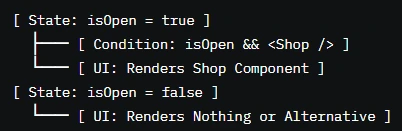
Theory: Conditional rendering displays UI elements based on state or props, like showing a shop in your toy city only if it’s open. It uses JavaScript operators (e.g., &&, ?:) or if statements.
- Use && for simple conditions (e.g., {isOpen && <Shop />}).
- Use ternary operators for alternatives (e.g., {isOpen ? <Shop /> : <Closed />}).
- Return null to render nothing.
- Conditional logic can be extracted to separate components.
- Rendering undefined or invalid JSX causes errors; use null checks.
- Complex conditions in JSX reduce readability; extract to functions.
- Conditional rendering in loops requires unique keys to avoid errors.
- Use && or ternaries for concise conditional rendering to keep JSX clean and readable in simple cases.
- Extract complex conditional logic into separate functions or components to improve maintainability and testability.
- Return null for components that shouldn’t render to avoid unnecessary DOM nodes and improve performance.
- Ensure conditional elements have unique key props when in lists to maintain React’s reconciliation accuracy.
- Test conditional rendering with React Testing Library to verify UI updates correctly based on state or props changes.
- Rendering undefined or non-JSX values (e.g., {condition && someValue}) causes runtime errors if someValue isn’t valid JSX.
- Embedding complex conditions in JSX makes components hard to read and debug; extract to functions or components.
- Omitting keys in conditionally rendered lists disrupts React’s diffing, causing UI glitches or performance issues.
- Failing to test conditional edge cases risks missing scenarios where the UI renders incorrectly or crashes.
Lists and Keys
Theory: Lists render multiple elements (e.g., a list of shops) using JavaScript’s map function. Keys are unique identifiers that help React track elements during updates, like labeling each shop in your toy city.
- Use map to render lists (e.g., items.map(item => <Item key={item.id} />)).
- Keys must be unique and stable to optimize reconciliation.
- Keys are not props; they’re internal to React’s diffing algorithm.
- Using array indices as keys risks errors if the list reorders, as indices are unstable.
- Duplicate keys cause rendering issues, breaking the UI.
- Complex list rendering without memoization slows performance.
- Use unique, stable IDs (e.g., database IDs) as keys to ensure accurate reconciliation during list updates.
- Avoid using array indices as keys, as they change on reordering, causing React to misidentify elements and rerender unnecessarily.
- Memoize list items with React.memo for performance in large or frequently updated lists, reducing render overhead.
- Extract list rendering logic to separate components for complex items to improve modularity and testability.
- Test list rendering with React Testing Library to verify correct rendering and updates, especially for edge cases like empty lists.
- Using indices as keys in dynamic lists (e.g., sortable lists) causes React to misrender or lose track of elements, leading to UI bugs.
- Duplicate keys in a list trigger rendering errors, as React cannot distinguish elements, causing unpredictable behavior.
- Rendering large lists without memoization or virtualization slows performance, especially on low-end devices.
- Failing to test list edge cases (e.g., empty or single-item lists) risks UI glitches or crashes in production.

Hooks: The Functional Paradigm Shift
Theory: Hooks (React 16.8, 2018) are functions that add state, lifecycle, and context capabilities to functional components, replacing class-based lifecycles. They’re like modular power-ups for your toy city’s components.
- useState: Manages local state.
- useEffect: Handles side effects (e.g., API calls).
- useContext: Accesses global context.
- useReducer: Manages complex state.
- useMemo/useCallback: Optimizes performance.
- useRef: Persists references.
- useLayoutEffect: Runs effects post-DOM updates.
- useImperativeHandle: Exposes methods from children.
- useTransition: Manages concurrent updates.
- Hooks are stored in a linked list in a component’s fiber node, ensuring order.
- Follow Rules of Hooks: unconditional, top-level calls.
- Custom Hooks encapsulate reusable logic.
useRef: Accessing DOM Elements & Persistent Values
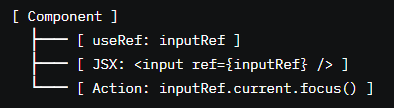
Theory: useRef creates a mutable reference that persists across renders, used for DOM access (e.g., focusing an input) or storing values without triggering re-renders.
- const ref = useRef(initialValue) returns a { current: initialValue } object.
- Use for DOM refs (e.g., <input ref={inputRef} />) or persistent values (e.g., timers).
- Does not cause re-renders when current changes.
- Accessing ref.current before DOM rendering returns null; check for existence.
- Overusing refs for state-like data bypasses React’s update mechanism.
- Refs in loops require unique instances to avoid conflicts.
- Use useRef to access DOM elements (e.g., focusing an input with inputRef.current.focus()) for precise control without state.
- Store non-rendering values (e.g., previous state, timers) in refs to avoid unnecessary re-renders, optimizing performance.
- Ensure refs are attached to valid DOM nodes before accessing to prevent null reference errors in dynamic UIs.
- Combine refs with useEffect for side effects (e.g., scrolling to an element on mount) to handle lifecycle-related tasks.
- Test ref behavior with React Testing Library to verify DOM interactions and persistent values work as expected.
- Accessing ref.current before the DOM renders causes null errors, breaking functionality; always check for existence.
- Using refs for state-like data (e.g., form values) bypasses React’s reactivity, leading to stale or inconsistent UIs.
- Creating refs in loops without unique instances overwrites references, causing unexpected behavior in lists.
- Failing to clean up ref-based side effects (e.g., timers) in useEffect causes memory leaks, impacting performance.
useMemo: Memoizing Expensive Calculations
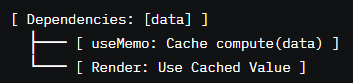
Theory: useMemo caches the result of expensive computations, recomputing only when dependencies change, optimizing performance.
- const value = useMemo(() => computeValue(a, b), [a, b]) caches computeValue.
- Dependencies ([a, b]) determine when to recompute.
- Used for computations like sorting or filtering large datasets.
- Missing dependencies cause stale values, leading to bugs.
- Overusing useMemo increases memory usage without benefits.
- Complex computations in useMemo can still slow renders if not optimized.
- Use useMemo for expensive operations (e.g., filtering a large array) to prevent re-computation on every render, improving performance.
- Include all dependencies used in the computation to ensure correct updates and avoid stale data.
- Profile performance with React’s Profiler to determine if useMemo is necessary, avoiding premature optimization.
- Extract complex computations to utility functions before memoizing to improve readability and testability.
- Test memoized values with Jest to verify correct caching and updates based on dependency changes.
- Omitting dependencies in useMemo causes stale values, leading to incorrect UI displays or logic errors.
- Over-memoizing simple computations wastes memory, complicating code without performance gains.
- Using useMemo for non-expensive operations adds unnecessary complexity, reducing maintainability.
- Failing to test memoized logic risks missing edge cases where dependencies don’t trigger updates correctly.
useCallback: Preventing Unnecessary Re-renders
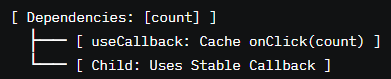
Theory: useCallback memoizes callback functions, preventing re-creation on renders unless dependencies change, optimizing child components.
- const callback = useCallback(() => doSomething(a), [a]) caches the function.
- Dependencies ([a]) determine when to recreate the function.
- Used for callbacks passed to memoized children (e.g., React.memo).
- Missing dependencies cause stale closures, leading to outdated logic.
- Overusing useCallback increases memory usage without benefits.
- Inline callbacks in JSX negate useCallback benefits.
- Use useCallback for callbacks passed to memoized components to prevent unnecessary re-renders, improving performance.
- Include all dependencies used in the callback to avoid stale closures and ensure correct behavior.
- Combine useCallback with React.memo for child components to maximize performance in dynamic UIs.
- Profile callback usage with React’s Profiler to confirm useCallback is needed, avoiding over-optimization.
- Test callbacks with React Testing Library to verify they execute correctly with updated dependencies.
- Omitting dependencies in useCallback creates stale closures, causing callbacks to use outdated state or props.
- Overusing useCallback for non-critical callbacks adds complexity without performance gains, bloating code.
- Using inline callbacks in JSX (e.g., onClick={() => doSomething()}) negates useCallback, triggering re-renders.
- Failing to test callback behavior risks bugs in dynamic scenarios, such as rapid state or prop changes.
useLayoutEffect: Running Effects After DOM Updates
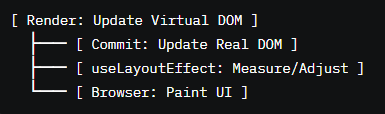
Theory: useLayoutEffect runs side effects synchronously after DOM updates but before painting, ideal for DOM measurements or layout adjustments.
- useLayoutEffect(() => { /* effect */ }, [deps]) mirrors useEffect but runs post-DOM update.
- Used for tasks like measuring element dimensions or adjusting scroll positions.
- Avoid in SSR, as it requires a browser environment.
- Running heavy computations in useLayoutEffect blocks painting, slowing the UI.
- Using in SSR causes errors, as it relies on DOM access.
- Missing cleanup risks memory leaks, like unstopped timers.
- Use useLayoutEffect for DOM-related side effects (e.g., measuring element width) to ensure accurate post-render updates.
- Prefer useEffect for non-DOM effects to avoid blocking the browser’s paint cycle and improve performance.
- Include cleanup functions in useLayoutEffect to remove event listeners or timers, preventing memory leaks.
- Avoid useLayoutEffect in SSR contexts by conditionally skipping it (e.g., checking typeof window).
- Test layout effects with React Testing Library to verify DOM updates and cleanup behavior.
- Heavy computations in useLayoutEffect delay painting, causing janky UI updates and poor user experience.
- Using useLayoutEffect in SSR environments causes errors, as it requires DOM access unavailable on the server.
- Forgetting cleanup in useLayoutEffect leads to memory leaks, such as lingering event listeners or timers.
- Overusing useLayoutEffect for non-layout tasks increases complexity, as useEffect is often sufficient.
useImperativeHandle: Exposing Methods from Child Components
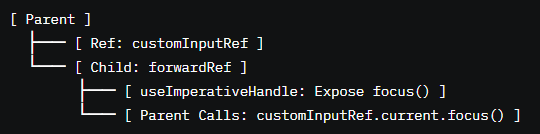
Theory: useImperativeHandle customizes the instance value exposed by a ref, allowing parent components to call child methods, like controlling a custom input.
- useImperativeHandle(ref, () => ({ method() {} }), [deps]) exposes methods via a ref.
- Used with forwardRef to pass refs to functional components.
- Enables parent control over child behavior (e.g., focusing an input).
- Overusing useImperativeHandle breaks encapsulation, making components tightly coupled.
- Missing dependencies cause stale methods, leading to outdated behavior.
- Complex exposed APIs complicate maintenance.
- Use useImperativeHandle sparingly with forwardRef for specific cases, like controlling a custom form input’s focus or reset.
- Keep exposed methods minimal to maintain encapsulation and ensure components remain independent and reusable.
- Include all dependencies in the dependency array to prevent stale methods and ensure correct behavior.
- Document exposed methods clearly to clarify their purpose for parent components, aiding team collaboration.
- Test imperative APIs with React Testing Library to verify parent-child interactions work as expected.
- Overusing useImperativeHandle for complex APIs couples components, reducing reusability and increasing maintenance costs.
- Omitting dependencies creates stale method references, causing incorrect behavior in dynamic scenarios.
- Exposing too many methods makes components hard to reason about, complicating debugging and testing.
- Failing to test imperative interactions risks bugs in parent-child communication, especially in complex UIs.
Custom Hooks: Creating Reusable Logic
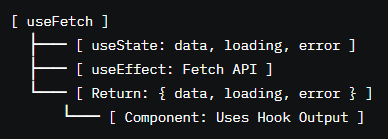
Theory: Custom Hooks are functions that encapsulate reusable logic using other Hooks, like a modular toolkit for your toy city’s components.
- Conditional Hook calls in custom Hooks break Rules of Hooks, causing errors.
- Missing dependencies in nested Hooks lead to stale data or logic.
- Overcomplicating custom Hooks reduces clarity.
- Create custom Hooks for repeated logic (e.g., useFetch for API calls) to reduce duplication and improve modularity.
- Follow Rules of Hooks in custom Hooks (unconditional, top-level calls) to ensure compatibility with React’s state tracking.
- Include all dependencies in nested Hooks to prevent stale closures and ensure correct behavior.
- Name custom Hooks clearly (e.g., useUserData) to indicate their purpose, improving code readability.
- Test custom Hooks with @testing-library/react-hooks to verify logic and edge cases, ensuring reliability.
- Conditional Hook calls in custom Hooks disrupt React’s state tracking, causing runtime errors and unpredictable behavior.
- Omitting dependencies in nested Hooks creates stale closures, leading to bugs like outdated data or logic.
- Overly complex custom Hooks reduce maintainability, making it harder to debug or reuse logic across components.
- Failing to test custom Hooks risks missing edge cases, such as error states or async failures, in production.
Routing & Navigation
Dynamic Routes and Route Parameters
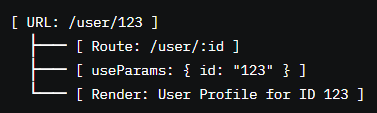
Theory: Dynamic routes in React Router map URLs with parameters (e.g., /user/:id) to components, enabling dynamic content like user profiles.
- Define routes with parameters (e.g., <Route path="/user/:id" element={<User />} />).
- Access params with useParams (e.g., const { id } = useParams()).
- Supports multiple params and optional segments.
- Invalid or missing params cause errors; validate with fallbacks.
- Nested dynamic routes require careful path design.
- Rapid param changes may trigger excessive renders.
- Use useParams to access route parameters safely, validating values to handle invalid or missing inputs gracefully.
- Define clear, hierarchical path structures for dynamic routes to avoid conflicts and ensure predictable navigation.
- Combine dynamic routes with data fetching (e.g., useEffect) to load content based on parameters, ensuring dynamic UIs.
- Use redirects or 404 components for invalid params to improve UX and prevent broken states.
- Test dynamic routes with Cypress to verify navigation and data loading for various parameter scenarios.
- Failing to validate params risks undefined errors, breaking components that rely on expected values.
- Overly complex dynamic paths cause conflicts, leading to incorrect route matching or navigation errors.
- Triggering excessive renders on param changes slows performance; debounce or memoize dependent logic.
- Neglecting to test edge cases (e.g., invalid params) risks broken UIs or crashes in production.
Nested Routes
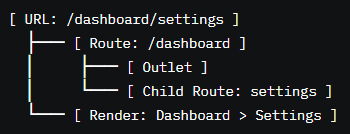
Theory: Nested routes define hierarchical URL structures (e.g., /dashboard/settings), mapping to nested components for complex UIs.
- Use <Route> with children (e.g., <Route path="/dashboard" element={<Dashboard />}> <Route path="settings" element={<Settings />} />).
- Render children with <Outlet> in the parent component.
- Supports relative paths for nested routes.
- Missing <Outlet> prevents child routes from rendering.
- Complex nesting increases reconciliation overhead.
- Path mismatches cause 404s or incorrect renders.
- Use <Outlet> in parent components to render child routes, ensuring hierarchical UI rendering works correctly.
- Design nested routes with clear, logical paths to align with app structure and improve user navigation.
- Combine nested routes with useLocation or useNavigate for programmatic navigation within hierarchies.
- Test nested routes with Cypress to verify rendering and navigation across parent-child scenarios.
- Optimize nested routes with lazy loading to reduce bundle size and improve performance in large apps.
- Omitting <Outlet> in parent components prevents child routes from rendering, breaking the UI.
- Overly deep nesting slows reconciliation, impacting performance in complex applications.
- Mismatched paths in nested routes cause 404 errors or incorrect rendering, confusing users.
- Failing to test nested navigation risks broken flows, especially for dynamic or authenticated routes.
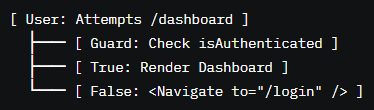
Theory: Redirects programmatically change routes (e.g., after login), while navigation guards protect routes based on conditions (e.g., authentication).
- Use useNavigate for redirects (e.g., navigate("/dashboard")).
- Implement guards with wrapper components or route logic (e.g., check auth state).
- React Router’s <Navigate> component handles declarative redirects.
- Rapid redirects cause history stack issues; debounce navigation.
- Unprotected routes expose sensitive data; always validate access.
- Redirect loops from incorrect logic break navigation.
- Use useNavigate for programmatic redirects after actions like form submission to streamline user flows.
- Implement navigation guards as wrapper components (e.g., ProtectedRoute) to centralize auth checks and improve maintainability.
- Use <Navigate> for declarative redirects in JSX to handle conditional routing cleanly.
- Validate auth state before rendering protected routes to prevent unauthorized access and ensure security.
- Test redirects and guards with Cypress to verify navigation flows and access control across scenarios.
- Rapid navigation calls overwhelm the history stack, causing performance issues or broken navigation.
- Failing to protect routes exposes sensitive data, compromising app security and user trust.
- Creating redirect loops (e.g., redirecting back and forth) breaks navigation, frustrating users.
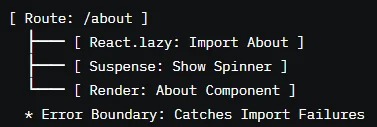
- Neglecting to test guard logic risks allowing unauthorized access or blocking valid users.
Lazy Loading with React Router
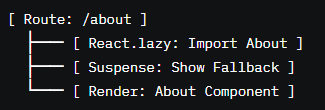
Theory: Lazy loading defers loading non-critical routes until needed, reducing initial bundle size and improving performance.
- Use React.lazy(() => import("./Component")) to dynamically import components.
- Wrap with <Suspense> to show fallbacks during loading.
- Combine with React Router for route-based lazy loading.
- Missing <Suspense> fallbacks cause blank screens during loading.
- Lazy-loaded components in SSR require special handling.
- Network failures during lazy loading need error boundaries.
- Lazy load non-critical routes (e.g., /about) with React.lazy and <Suspense> to optimize initial load times.
- Provide meaningful fallback UIs (e.g., loading spinners) in <Suspense> to improve UX during dynamic imports.
- Use error boundaries with lazy-loaded components to handle import failures gracefully and prevent crashes.
- Test lazy loading with Cypress to verify loading states and error handling across network conditions.
- Optimize lazy-loaded bundles with Webpack’s code-splitting to minimize size and improve performance.
- Omitting <Suspense> fallbacks results in blank screens, degrading UX during lazy loading.
- Using lazy loading in SSR without proper configuration causes hydration errors, breaking interactivity.
- Failing to handle network failures during imports crashes the app, requiring error boundaries to recover.
- Overusing lazy loading for small components adds overhead without significant performance gains.
Styling in React
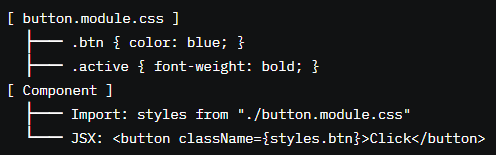
Theory: CSS Modules scope styles to components, preventing global conflicts by generating unique class names.
- Define styles in .module.css files (e.g., button.module.css).
- Import and use as objects (e.g., import styles from "./button.module.css"; <button className={styles.btn}>).
- Supports composable classes and dynamic styling.
- Naming conflicts in large apps require careful file organization.
- Overusing global selectors (e.g., :global) defeats scoping.
- Complex styles in modules reduce readability.
- Use CSS Modules for component-scoped styling to prevent conflicts and improve maintainability in large apps.
- Name classes descriptively (e.g., styles.primaryButton) to clarify their purpose and enhance readability.
- Leverage CSS Modules’ composes for reusable styles, reducing duplication and improving consistency.
- Optimize CSS delivery with code-splitting or critical CSS extraction to reduce initial load times.
- Test styled components with React Testing Library to verify correct rendering and responsiveness.
- Poorly organized module files cause naming conflicts, leading to unexpected styles in large projects.
- Overusing :global selectors negates scoping benefits, causing conflicts similar to global CSS.
- Writing overly complex styles in modules reduces readability, making maintenance harder for teams.
- Failing to optimize CSS delivery bloats bundles, slowing page loads and impacting performance.
Styled-Components
Theory: Styled-Components is a CSS-in-JS library that defines styles in JavaScript, using tagged template literals for dynamic styling.
- Define styles with styled.tag (e.g., const Button = styled.button`color: blue;`).
- Supports props for dynamic styles (e.g., ${props => props.primary ? 'blue' : 'gray'}).
- Generates unique class names for scoping.
- Server-side rendering requires ServerStyleSheet for correct style injection.
- Overusing dynamic styles increases runtime overhead.
- Complex styled components reduce readability.
- Use Styled-Components for dynamic, prop-based styling to create flexible, reusable components.
- Leverage theme providers (e.g., ThemeProvider) for consistent styling across the app, improving maintainability.
- Optimize SSR with ServerStyleSheet to ensure styles render correctly on the server, avoiding hydration issues.
- Keep styled components focused and minimal to maintain readability and facilitate debugging.
- Test styled components with React Testing Library to verify style application and dynamic behavior.
- Incorrect SSR setup causes style mismatches, breaking hydration and leading to inconsistent UI rendering.
- Overusing dynamic styles in Styled-Components increases runtime overhead, slowing rendering and impacting performance.
- Writing complex styled components reduces readability, making maintenance harder for teams.
- Failing to test style application risks missing edge cases, such as theme or prop-based style failures.

Tailwind CSS with React
Theory: Tailwind CSS is a utility-first CSS framework that applies styles via class names in JSX, enabling rapid, responsive design.
- Add Tailwind via CDN or build tools (e.g., npm install tailwindcss).
- Use utility classes in JSX (e.g., <div className="bg-blue-500 text-white">).
- Supports responsive prefixes (e.g., md:bg-blue-600) and custom themes.
- Large class lists reduce JSX readability; extract to components.
- Unoptimized Tailwind builds increase bundle size.
- Overusing utilities for simple styles adds unnecessary complexity.
- Use Tailwind for rapid prototyping and responsive design, leveraging utility classes to streamline CSS development.
- Extract repeated class combinations into reusable components to improve JSX readability and maintainability.
- Optimize Tailwind builds by purging unused styles with tools like PurgeCSS to reduce bundle size and improve performance.
- Use Tailwind’s responsive prefixes (e.g., sm:, md:) to ensure consistent design across device sizes.
- Test Tailwind-styled components with React Testing Library to verify responsiveness and style application.
- Long class lists in JSX (e.g., className="p-4 m-2 bg-blue-500...") reduce readability, complicating maintenance.
- Failing to purge unused Tailwind styles bloats bundles, slowing page loads and impacting user experience.
- Overusing utilities for simple styles adds unnecessary complexity, increasing development time.
- Neglecting to test responsive styles risks broken layouts on different devices, degrading UX.

Emotion
Theory: Emotion is a CSS-in-JS library similar to Styled-Components, offering flexible, dynamic styling with a focus on performance.
- Use css prop or styled components (e.g., const Button = styled.button`color: blue;`).
- Supports dynamic styles via props or theme providers.
- Optimized for SSR and performance with minimal runtime overhead.
- Incorrect SSR setup causes style hydration issues.
- Overusing dynamic styles increases runtime costs.
- Complex Emotion styles reduce readability.
- Use Emotion for dynamic styling in performance-critical apps, leveraging its lightweight runtime and SSR support.
- Utilize theme providers for consistent styling across components, improving maintainability and scalability.
- Optimize SSR with Emotion’s CacheProvider to ensure correct style injection on the server, avoiding hydration errors.
- Keep Emotion styles concise and focused to maintain readability and facilitate debugging.
- Test Emotion-styled components with React Testing Library to verify style application and dynamic behavior.
- Misconfiguring SSR with Emotion causes style mismatches, breaking UI consistency on client hydration.
- Overusing dynamic styles in Emotion increases runtime overhead, slowing rendering in large apps.
- Writing complex Emotion styles reduces readability, complicating maintenance for teams.
- Failing to test style application risks missing edge cases, such as theme-based style failures.

Inline Styles
Theory: Inline styles apply CSS directly in JSX via the style prop, offering simple but limited styling for small-scale use.
- Use style prop with object (e.g., <div style={{ color: "blue" }}>).
- Supports camelCase properties (e.g., backgroundColor).
- Limited by lack of pseudo-classes (e.g., :hover) and media queries.
- Inline styles reduce reusability, as they’re tied to specific JSX elements.
- Complex inline styles make JSX hard to read.
- Performance overhead in large apps due to repeated style whistled.
- Use inline styles sparingly for one-off styles (e.g., dynamic positioning) to keep JSX clean and maintainable.
- Extract reusable styles to CSS Modules or Styled-Components to improve modularity and scalability.
- Use camelCase for style properties (e.g., fontSize) to align with JavaScript conventions and ensure correctness.
- Avoid complex logic in inline styles to maintain readability; move to utility functions or external styles.
- Test inline styles with React Testing Library to verify correct application and dynamic behavior.
- Overusing inline styles reduces reusability, making it hard to maintain consistent designs across components.
- Complex inline style objects (e.g., { color: condition ? "blue" : "gray" }) clutter JSX, reducing readability.
- Inline styles lack support for pseudo-classes or media queries, limiting styling capabilities for responsive designs.
- Failing to test inline styles risks missing dynamic behavior issues, especially in conditional scenarios.

State Management
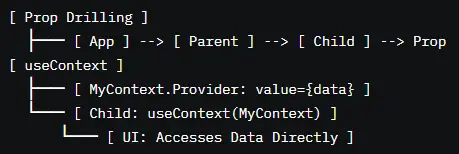
Theory: Prop drilling passes data through multiple component layers, while useContext provides global state access, reducing complexity.
- Prop Drilling: Pass props through components (e.g., <Parent prop={data}><Child prop={data}>).
- useContext: Create a context (e.g., const MyContext = createContext()) and access with useContext(MyContext).
- Context simplifies sharing data like themes or user info.
- Prop drilling in deep hierarchies reduces maintainability.
- Overusing context for local state adds unnecessary complexity.
- Context updates trigger re-renders in all consumers.
- Use useContext for global data (e.g., user auth, theme) to avoid prop drilling and simplify data flow in large apps.
- Keep context data minimal to reduce re-renders, as all consumers re-render on context updates.
- Combine useContext with useReducer for complex global state to centralize logic and improve predictability.
- Document context APIs clearly to clarify usage for teams, enhancing collaboration and maintenance.
- Test context usage with React Testing Library to verify data access and updates across components.
- Overusing useContext for component-specific data adds complexity, as context is meant for global state.
- Prop drilling in large apps creates brittle, hard-to-maintain code, increasing refactoring costs.
- Failing to memoize context values causes excessive re-renders, slowing performance in dynamic UIs.
- Neglecting to test context consumers risks missing edge cases, such as stale data or update failures.
Redux: Basics and Toolkit
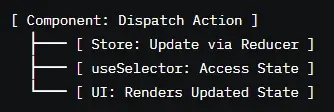
Theory: Redux is a global state management library using a single store, actions, and reducers for predictable state updates.
- Store: Single source of truth for state.
- Actions: Objects describing changes (e.g., { type: "INCREMENT" }).
- Reducers: Pure functions updating state based on actions.
- Redux Toolkit: Simplifies setup with createSlice, configureStore.
- Boilerplate-heavy setup in vanilla Redux increases complexity.
- Overusing Redux for local state bloats the store.
- Async logic requires middleware (e.g., Redux Thunk).
- Use Redux Toolkit to reduce boilerplate with utilities like createSlice and createAsyncThunk for simpler state management.
- Store only global, app-wide state in Redux (e.g., user data) to keep the store lean and maintainable.
- Use useSelector and useDispatch Hooks for efficient state access and updates in functional components.
- Memoize selectors with reselect to prevent unnecessary re-renders, optimizing performance in large apps.
- Test Redux logic with Jest to verify actions, reducers, and async thunks handle state updates correctly.
- Overusing Redux for local state bloats the store, increasing complexity and reducing performance.
- Missing middleware for async logic (e.g., API calls) causes errors or stale data in dynamic apps.
- Failing to memoize selectors triggers excessive re-renders, slowing UIs with frequent state changes.
- Neglecting to test Redux logic risks bugs in state updates, especially for complex or async scenarios.
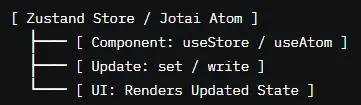
Theory: Zustand and Jotai are lightweight state management libraries offering simpler APIs than Redux for modern React apps.
- Zustand: Creates minimal stores with create (e.g., const useStore = create(set => ({ count: 0 }))).
- Jotai: Uses atoms for granular state (e.g., const countAtom = atom(0)).
- Both integrate with Hooks for easy access.
- Overusing atoms in Jotai increases complexity for simple state.
- Zustand’s simplicity may lack structure for very large apps.
- Missing memoization causes re-renders in dynamic UIs.
- Use Zustand for simple global state with minimal boilerplate, ideal for small to medium apps with straightforward needs.
- Leverage Jotai for granular state management in complex UIs, allowing fine-grained updates with atoms.
- Memoize selectors or computed values to prevent unnecessary re-renders, optimizing performance in dynamic apps.
- Combine with useEffect or middleware for async logic (e.g., API calls) to handle side effects cleanly.
- Test state logic with Jest or React Testing Library to verify updates and edge cases, ensuring reliability.
- Overusing Jotai atoms for simple state adds unnecessary complexity, slowing development and maintenance.
- Using Zustand without structure in large apps risks disorganized state, complicating debugging.
- Failing to memoize selectors causes excessive re-renders, degrading performance in dynamic UIs.
- Neglecting to test state updates risks bugs in complex scenarios, such as async or conditional updates.
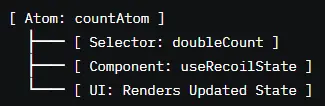
Recoil
Theory: Recoil is a state management library for React, using atoms and selectors for granular, reactive state management.
- Atoms: Units of state (e.g., const countAtom = atom({ key: "count", default: 0 })).
- Selectors: Derived state (e.g., const doubleCount = selector({ get: ({ get }) => get(countAtom) * 2 })).
- Uses Hooks like useRecoilState, useRecoilValue.
- Overusing atoms for simple state increases complexity.
- Missing selector memoization causes re-renders.
- Experimental status may introduce breaking changes.
- Use Recoil for complex, granular state management in large apps, leveraging atoms for fine-grained updates.
- Create selectors for derived state to compute values efficiently, reducing redundant calculations.
- Memoize selectors to prevent unnecessary re-renders, optimizing performance in dynamic UIs.
- Document atom and selector usage to clarify their purpose, aiding team collaboration and maintenance.
- Test Recoil state with React Testing Library to verify updates and edge cases, ensuring robust behavior.
- Overusing atoms for simple state adds complexity, slowing development and maintenance.
- Failing to memoize selectors triggers excessive re-renders, degrading performance in dynamic apps.
- Relying on Recoil’s experimental features risks breaking changes in future updates, impacting stability.
- Neglecting to test Recoil logic risks bugs in complex scenarios, such as async or conditional updates.
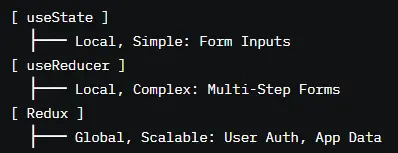
Comparing useState vs. useReducer vs. Redux
Theory: useState, useReducer, and Redux offer different state management approaches, balancing simplicity, complexity, and scalability.
- useState: Simple, local state for component-specific data (e.g., form inputs).
- useReducer: Complex local state with reducer logic for structured updates (e.g., multi-step forms).
- Redux: Global state with a single store, ideal for large, shared state needs.
- Using useState for complex logic increases component complexity.
- useReducer in simple cases adds unnecessary overhead.
- Redux for local state bloats the store, reducing performance.
- Use useState for simple, component-specific state to keep logic localized and maintainable in small UIs.
- Employ useReducer for complex local state (e.g., wizards) to centralize logic and improve predictability.
- Reserve Redux for global, app-wide state (e.g., user auth) to ensure scalability in large applications.
- Combine useReducer with Context for medium-sized apps to avoid Redux’s boilerplate while maintaining structure.
- Test state management with React Testing Library to verify updates, edge cases, and performance across scenarios.
- Using useState for complex state logic creates unwieldy components, reducing maintainability and testability.
- Overusing useReducer for simple state adds unnecessary complexity, slowing development.
- Storing local state in Redux bloats the store, increasing complexity and degrading performance.
- Failing to test state transitions risks bugs in complex scenarios, such as async updates or error states.
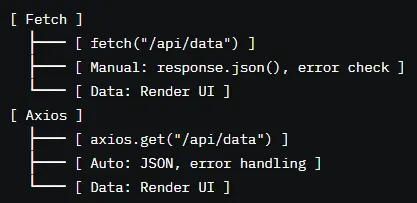
Data Fetching & APIs
Theory: Axios and fetch are methods for making HTTP requests to APIs, fetching data for React components.
- Fetch: Built-in browser API, minimal but requires manual response handling.
- Axios: Third-party library with interceptors, automatic JSON parsing, and better error handling.
- Fetch requires manual error handling (e.g., checking response.ok).
- Axios interceptors can complicate debugging if misconfigured.
- Large requests without cancellation risk memory leaks.
- Use Axios for complex apps, leveraging interceptors for auth tokens or logging to simplify request management.
- Use fetch for simple apps or when minimizing dependencies, ensuring manual error handling is robust.
- Implement request cancellation (e.g., AbortController with fetch, Axios’ cancel token) to prevent memory leaks.
- Handle loading and error states with state management to provide clear UX feedback during API calls.
- Test API requests with MSW and React Testing Library to simulate network conditions and verify error handling.
- Failing to handle fetch errors (e.g., non-200 responses) risks silent failures, breaking UI updates.
- Misconfiguring Axios interceptors causes request failures, complicating debugging in large apps.
- Uncancelled requests on component unmount cause memory leaks, impacting performance.
- Neglecting to test API edge cases risks bugs, such as handling network failures or invalid responses.
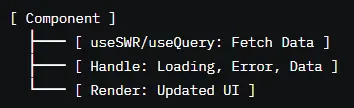
SWR or React Query
Theory: SWR and React Query are data fetching libraries that handle server state with caching, refetching, and Suspense integration.
- SWR: useSWR(key, fetcher) for simple, cached fetching with stale-while-revalidate.
- React Query: useQuery(key, fetcher) for advanced features like mutations, optimistic updates.
- Both integrate with React Hooks and Suspense.
- Incorrect cache keys cause stale data or redundant fetches.
- Overfetching without caching increases server load.
- Missing error handling breaks UX during failures.
- Use React Query for complex apps with mutations, caching, and optimistic updates to streamline data management.
- Use SWR for simpler apps with lightweight fetching and automatic refetching, reducing boilerplate.
- Configure cache keys uniquely to ensure correct data retrieval and avoid cache conflicts.
- Handle loading and error states with Suspense or conditional rendering for clear UX feedback.
- Test fetching logic with MSW to simulate network conditions and verify error handling.
- Incorrect cache keys in SWR or React Query cause stale or incorrect data, breaking UI consistency.
- Overfetching without caching increases server load, slowing performance and impacting UX.
- Failing to handle errors leaves users without feedback, degrading experience during network failures.
- Neglecting to test fetching edge cases risks bugs, such as handling slow networks or invalid responses.
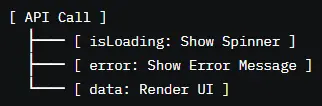
Loading & Error States
Theory: Loading and error states provide UX feedback during API calls, ensuring users know the app’s status.
- Use state (e.g., useState) to track isLoading, error, and data.
- Render conditionally (e.g., {isLoading ? <Spinner /> : <Data />}).
- Integrate with Suspense for loading fallbacks.
- Missing loading states cause blank screens, frustrating users.
- Unhandled errors crash components or show stale data.
- Rapid state changes require debouncing to stabilize UI.
- Always display loading states (e.g., spinners) during API calls to inform users of ongoing operations.
- Handle errors with clear messages (e.g., “Failed to load data”) to guide users and prevent confusion.
- Use Suspense with React Query or SWR for seamless loading state management in async scenarios.
- Debounce rapid state updates to prevent UI flicker and improve performance in dynamic apps.
- Test loading and error states with React Testing Library to verify UX feedback across scenarios.
- Omitting loading states leaves users staring at blank screens, degrading UX during API delays.
- Unhandled errors cause crashes or stale data displays, breaking UI reliability and user trust.
- Rapid state changes without debouncing create janky UI updates, frustrating users.
- Failing to test error states risks missing critical UX feedback, such as network failure scenarios.
Debouncing API Calls
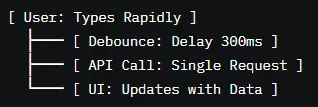
Theory: Debouncing delays API calls to prevent excessive requests during rapid user actions (e.g., typing in a search bar).
- Use libraries like Lodash (_.debounce) or custom timers to delay calls.
- Apply to high-frequency events (e.g., onChange for inputs).
- Combine with state to store debounced values.
- Incorrect debounce timing causes delayed or missed requests.
- Failing to cancel debounced calls on unmount risks memory leaks.
- Over-debouncing slows UX for time-sensitive actions.
- Use Lodash’s debounce for high-frequency events (e.g., search inputs) to reduce API calls and improve performance.
- Set appropriate debounce delays (e.g., 300ms) to balance responsiveness and request frequency.
- Cancel debounced calls in useEffect cleanup to prevent memory leaks when components unmount.
- Combine debouncing with state to store intermediate values, ensuring UI updates reflect user input.
- Test debounced calls with React Testing Library to verify timing and cancellation behavior.
- Incorrect debounce delays (e.g., too long) slow UX, frustrating users waiting for results.
- Failing to cancel debounced calls on unmount causes memory leaks, impacting app performance.
- Over-debouncing critical actions delays necessary updates, reducing responsiveness.
- Neglecting to test debounce logic risks missing edge cases, such as rapid input or unmount scenarios.
Pagination and Infinite Scrolling
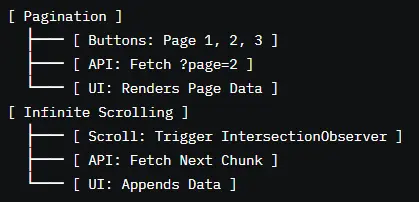
Theory: Pagination and infinite scrolling manage large datasets by loading data in chunks, improving performance and UX.
- Pagination: Load specific pages (e.g., ?page=2) with buttons or links.
- Infinite Scrolling: Load more data on scroll (e.g., using IntersectionObserver).
- Use state or libraries like React Query for data management.
- Missing loading states during pagination confuse users.
- Infinite scrolling without limits overloads the DOM or server.
- Rapid scrolls trigger excessive requests without debouncing.
- Use pagination for controlled data navigation (e.g., tables) to provide clear user control and predictable loading.
- Implement infinite scrolling with IntersectionObserver for seamless UX in feeds or lists, loading data as users scroll.
- Debounce scroll events to prevent excessive API calls, improving performance and reducing server load.
- Display loading states during data fetching to inform users, enhancing UX during pagination or scrolling.
- Test pagination and scrolling with Cypress to verify data loading, UX feedback, and edge cases like empty datasets.
- Omitting loading states during pagination or scrolling leaves users without feedback, degrading UX.
- Unbounded infinite scrolling bloats the DOM, slowing performance and crashing browsers on low-end devices.
- Undebounced scroll events trigger excessive API calls, overloading servers and slowing the app.
- Failing to test edge cases (e.g., no more data) risks broken UIs or infinite loading loops.
Performance Optimization
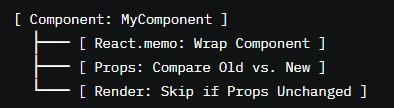
Theory: React.memo memoizes components, preventing re-renders if props are unchanged, optimizing performance.
- Wrap components with React.memo (e.g., export default React.memo(MyComponent)).
- Compares props shallowly to determine re-rendering.
- Best for pure components with stable props.
- Overusing React.memo increases memory usage without benefits.
- Deep prop changes require custom comparison functions.
- Unstable props negate memoization benefits.
- Apply React.memo to pure components with stable props to prevent unnecessary re-renders in dynamic UIs.
- Use custom comparison functions for deep prop checks when shallow comparison is insufficient.
- Combine with useCallback for callback props to ensure stability and maximize memoization benefits.
- Profile with React’s Profiler to confirm React.memo reduces renders, avoiding premature optimization.
- Test memoized components with React Testing Library to verify rendering behavior and edge cases.
- Overusing React.memo for components with frequent prop changes adds overhead without performance gains.
- Shallow prop comparison misses deep changes, causing stale UI if not addressed with custom logic.
- Passing unstable props (e.g., inline objects or functions) to React.memo-wrapped components negates memoization, causing unnecessary re-renders and degrading performance.
- Failing to test memoized components risks missing edge cases, such as prop changes that incorrectly trigger or skip renders, leading to stale or inconsistent UIs.
- Overusing React.memo in small apps adds complexity without significant performance gains, increasing maintenance overhead.
- Neglecting to profile memoization effectiveness wastes optimization efforts, as not all components benefit from memoization.
Lazy Loading & Code Splitting (React.lazy, Suspense)
Theory: Lazy loading and code splitting defer loading non-critical code (e.g., components or routes) until needed, reducing initial bundle size and improving load times.
- Use React.lazy(() => import("./Component")) for dynamic imports.
- Wrap lazy-loaded components in <Suspense> with a fallback UI (e.g., <Suspense fallback={<Spinner />}>).
- Combine with React Router for route-based code splitting.
- Missing <Suspense> fallbacks causes blank screens during loading, degrading UX.
- Lazy loading in server-side rendering (SSR) requires special handling to avoid hydration errors.
- Network failures during dynamic imports need error boundaries to prevent crashes.
- Over-splitting small components adds overhead without benefits.
- Apply React.lazy and <Suspense> to non-critical routes or components (e.g., /about page) to optimize initial load times.
- Provide meaningful fallback UIs (e.g., loading spinners or skeletons) in <Suspense> to enhance UX during loading.
- Use error boundaries (e.g., react-error-boundary) to handle import failures gracefully, ensuring app stability.
- Optimize bundle splitting with Webpack’s code-splitting features to minimize chunk sizes and improve performance.
- Test lazy-loaded components with Cypress to verify loading states, error handling, and network edge cases.
- Omitting <Suspense> fallbacks results in blank screens, frustrating users during dynamic imports.
- Using lazy loading in SSR without proper configuration (e.g., loadable-components) causes hydration mismatches, breaking interactivity.
- Failing to handle network failures during imports crashes the app, requiring error boundaries for recovery.
- Over-splitting small components increases HTTP requests, slowing load times and negating performance gains.
useMemo & useCallback
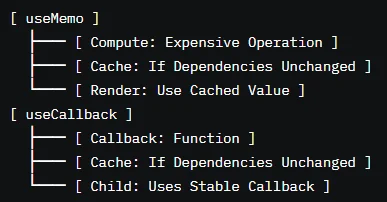
Theory: useMemo caches expensive computations, and useCallback memoizes functions, both reducing unnecessary work to optimize performance.
- useMemo(() => computeValue(a, b), [a, b]): Caches values based on dependencies.
- useCallback(() => doSomething(a), [a]): Caches functions for stable props.
- Both prevent re-renders in memoized components or effects.
- Missing dependencies cause stale values or closures, leading to bugs.
- Overusing useMemo/useCallback increases memory usage without benefits.
- Complex logic in memoized functions reduces readability.
- Use useMemo for costly computations (e.g., sorting large arrays) to avoid redundant work on renders, improving performance.
- Apply useCallback to callbacks passed to memoized components (e.g., React.memo) to prevent unnecessary re-renders.
- Include all dependencies in dependency arrays to ensure correct updates and avoid stale data or logic.
- Profile with React’s Profiler to confirm optimization benefits, avoiding premature use of useMemo/useCallback.
- Test memoized logic with Jest to verify caching behavior and edge cases, ensuring reliability.
- Omitting dependencies in useMemo/useCallback creates stale values or closures, causing incorrect UI or logic.
- Overusing useMemo/useCallback for simple operations adds complexity without performance gains, bloating code.
- Embedding complex logic in memoized functions reduces readability, complicating maintenance and debugging.
- Failing to test memoized logic risks missing edge cases, such as dependency changes or async updates.
Virtualization with react-window or react-virtualized
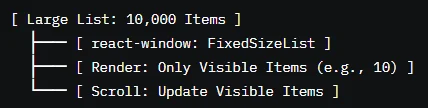
Theory: Virtualization renders only visible items in large lists (e.g., tables, feeds), reducing DOM nodes and improving performance.
- Use react-window’s FixedSizeList or VariableSizeList for fixed or dynamic item sizes.
- react-virtualized offers components like List, Table, or InfiniteLoader.
- Calculates visible items based on scroll position.
- Incorrect item size estimates cause rendering glitches or scroll jumps.
- Rapid scrolling without debouncing overloads rendering.
- Virtualization in SSR requires careful handling to avoid mismatches.
- Use react-window for lightweight virtualization in lists or grids to minimize DOM nodes and boost performance.
- Measure item sizes accurately (e.g., via getBoundingClientRect) for VariableSizeList to ensure smooth scrolling.
- Debounce scroll events to prevent excessive re-renders during rapid scrolling, improving responsiveness.
- Combine with infinite scrolling (e.g., react-window’s InfiniteLoader) for seamless data loading in large datasets.
- Test virtualized components with Cypress to verify rendering, scrolling, and edge cases like empty lists.
- Incorrect item size estimates cause scroll jumps or missing items, degrading UX in virtualized lists.
- Undebounced scrolling triggers excessive renders, slowing performance on low-end devices.
- Using virtualization in SSR without proper setup causes hydration errors, breaking interactivity.
- Failing to test edge cases (e.g., large datasets, empty lists) risks rendering bugs or performance issues.
Reusable Component Patterns
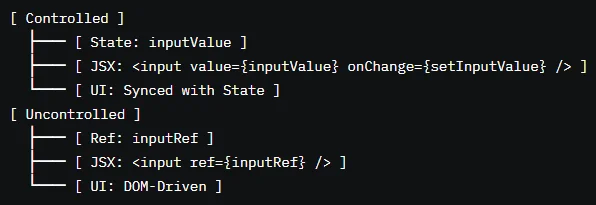
Theory: Controlled components manage form inputs via React state, while uncontrolled components rely on the DOM, offering different trade-offs.
- Controlled: Use value and onChange (e.g., <input value={state} onChange={setState} />).
- Uncontrolled: Use ref to access DOM values (e.g., <input ref={inputRef} />).
- Controlled offers predictable state; uncontrolled is simpler for one-off forms.
- Controlled components require state updates for every keystroke, impacting performance.
- Uncontrolled components lose React’s reactivity, complicating validation.
- Mixing controlled and uncontrolled logic causes inconsistencies.
- Use controlled components for dynamic forms requiring validation or real-time updates to ensure predictable state management.
- Opt for uncontrolled components in simple forms (e.g., one-time submissions) to reduce boilerplate and improve performance.
- Combine controlled components with debouncing for high-frequency inputs (e.g., search) to optimize performance.
- Use TypeScript or PropTypes to validate input props, ensuring robust form behavior across scenarios.
- Test form components with React Testing Library to verify state updates, validation, and submission logic.
- Overusing controlled components for large forms without debouncing slows performance due to frequent re-renders.
- Relying on uncontrolled components for complex forms loses React’s reactivity, complicating validation or state syncing.
- Mixing controlled and uncontrolled logic in the same form causes inconsistent behavior, confusing users and developers.
- Failing to test form edge cases risks bugs, such as invalid submissions or unhandled input states.
Compound Components
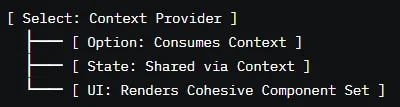
Theory: Compound components are a pattern where multiple components share state implicitly via context, creating flexible, reusable APIs (e.g., <Select> with <Option>).
- Use React.createContext to share state between components.
- Parent provides context (e.g., <Select>); children consume it (e.g., <Option>).
- Example: <Select><Option>Item 1</Option></Select>.
- Missing context providers cause runtime errors in children.
- Overly complex context APIs reduce maintainability.
- Context updates trigger re-renders in all consumers.
- Use compound components for flexible APIs (e.g., forms, menus) to create reusable, intuitive component sets.
- Provide clear context APIs with TypeScript or PropTypes to document usage and ensure type safety.
- Memoize context values to prevent unnecessary re-renders in consuming components, optimizing performance.
- Keep compound components modular and focused to maintain readability and facilitate debugging.
- Test compound components with React Testing Library to verify context sharing and child interactions.
- Omitting context providers causes children to error, breaking the UI and requiring defensive checks.
- Overcomplicating context APIs makes components hard to use, increasing developer friction and bugs.
- Unmemoized context values trigger excessive re-renders, slowing performance in dynamic UIs.
- Failing to test compound component interactions risks bugs in state sharing or child rendering.
Render Props
Theory: Render props allow components to share logic by passing a render function as a prop, enabling flexible UI composition.
- Component accepts a function prop (e.g., <DataFetcher render={data => <div>{data}</div>} />).
- Shares logic (e.g., state, methods) via the function.
- Useful for cross-cutting concerns like data fetching or mouse tracking.
- Overusing render props increases JSX complexity, reducing readability.
- Unstable render functions cause re-renders, impacting performance.
- Render props in large apps complicate component hierarchies.
- Use render props for shared logic requiring flexible rendering (e.g., data fetching, animations) to enhance reusability.
- Stabilize render functions with useCallback to prevent unnecessary re-renders in child components.
- Keep render prop APIs simple and focused to maintain readability and ease of use.
- Document render prop signatures with TypeScript or PropTypes to clarify usage for teams.
- Test render prop components with React Testing Library to verify logic sharing and rendering behavior.
- Overusing render props for simple logic adds unnecessary complexity, making JSX harder to read and maintain.
- Unstable render functions (e.g., inline functions) trigger re-renders, degrading performance in dynamic UIs.
- Complex render prop hierarchies complicate debugging, increasing maintenance costs in large apps.
- Failing to test render prop logic risks bugs in shared state or rendering edge cases.
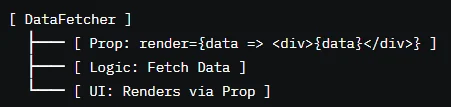
Higher-Order Components (HOCs)
Theory: HOCs are functions that wrap components to enhance them with shared logic, like authentication or logging.
- HOC takes a component and returns an enhanced one (e.g., withAuth(Component)).
- Passes props, state, or methods to the wrapped component.
- Example: const Enhanced = withAuth(MyComponent).
- HOCs can cause prop name collisions, leading to unexpected behavior.
- Overusing HOCs creates wrapper hell, complicating debugging.
- HOCs in modern React are often replaced by Hooks.
- Use HOCs sparingly for cross-cutting concerns (e.g., auth, logging) in legacy code or when Hooks aren’t suitable.
- Avoid prop name collisions by using unique prefixes or namespaces for HOC props to ensure clarity.
- Combine HOCs with memoization to prevent unnecessary re-renders, optimizing performance.
- Migrate HOCs to custom Hooks in modern React for simpler, more idiomatic code.
- Test HOCs with React Testing Library to verify enhanced behavior and prop passing.
- Prop name collisions in HOCs overwrite props, causing bugs or unexpected component behavior.
- Overusing HOCs creates deep wrapper chains, complicating debugging and increasing maintenance costs.
- Using HOCs for logic better suited to Hooks ignores modern React practices, reducing compatibility.
- Failing to test HOC behavior risks bugs in prop passing or enhanced functionality.
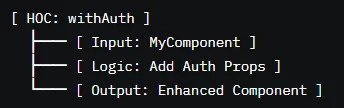
Portals (Modals, Tooltips, etc.)
Theory: Portals render components outside the parent DOM hierarchy (e.g., at <body>), ideal for modals, tooltips, or overlays.
- Use ReactDOM.createPortal(child, container) to render in a specific DOM node.
- Combine with state to control visibility (e.g., isModalOpen).
- Ensures proper stacking and accessibility for overlays.
- Portals in SSR require special handling to avoid hydration issues.
- Missing event propagation handling (e.g., clicks outside modals) breaks UX.
- Improper portal cleanup risks DOM leaks.
- Use portals for overlays like modals or tooltips to ensure correct stacking and accessibility outside the component hierarchy.
- Handle click-outside events with useEffect and event listeners to close modals or tooltips, improving UX.
- Ensure portals are accessible (e.g., ARIA attributes, focus trapping) to support screen readers and keyboard navigation.
- Clean up portals on unmount to prevent DOM leaks, using useEffect cleanup functions.
- Test portals with React Testing Library to verify rendering, accessibility, and interaction behavior.
- Using portals in SSR without proper setup causes hydration mismatches, breaking interactivity.
- Failing to handle click-outside events leaves modals or tooltips open, frustrating users.
- Neglecting accessibility (e.g., focus trapping) excludes users relying on keyboards or screen readers.
- Forgetting to clean up portals on unmount causes DOM leaks, impacting performance.
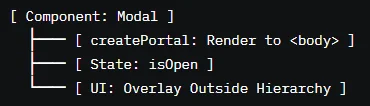
Authentication & Authorization
Theory: Login state tracks user authentication (e.g., logged in/out) using state management (e.g., Context, Redux) to control UI and access.
- Store user state (e.g., { isAuthenticated, user }) in Context or Redux.
- Update state on login/logout (e.g., via API responses).
- Use state to conditionally render UI (e.g., <Profile> or <Login>).
- Stale auth state causes incorrect UI rendering (e.g., showing protected content).
- Rapid login/logout actions require debouncing to stabilize state.
- Missing state persistence loses user sessions on refresh.
- Use Context or Redux for global auth state to centralize management and simplify access across components.
- Persist auth state in localStorage or cookies (with security measures) to maintain sessions across page refreshes.
- Debounce rapid auth actions (e.g., login attempts) to prevent race conditions and ensure stable state updates.
- Validate auth state on app load to ensure accurate UI rendering and access control.
- Test auth state with React Testing Library to verify login/logout flows and edge cases like expired tokens.
- Stale auth state from unhandled API errors causes incorrect UI, such as showing protected content to unauthenticated users.
- Unpersisted state on refresh forces users to re-login, degrading UX and frustrating users.
- Undebounced auth actions create race conditions, leading to inconsistent state or errors.
- Failing to test auth edge cases risks bugs, such as handling expired tokens or failed logins.
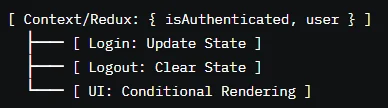
Protecting Routes
Theory: Protected routes restrict access to authenticated users, redirecting unauthorized users to login or error pages.
- Create wrapper components (e.g., <ProtectedRoute>).
- Check auth state (e.g., isAuthenticated) and redirect with useNavigate or <Navigate>.
- Combine with React Router for seamless integration.
- Unprotected routes expose sensitive data, compromising security.
- Rapid navigation causes redirect loops or stale checks.
- Missing loading states during auth checks confuse users.
- Use a <ProtectedRoute> component to centralize auth checks, simplifying route protection and maintenance.
- Validate auth state on route entry to ensure only authorized users access protected content.
- Provide loading states during auth checks (e.g., spinners) to inform users and improve UX.
- Redirect unauthorized users to a login page with useNavigate or <Navigate> for seamless navigation.
- Test protected routes with Cypress to verify access control and redirect behavior across scenarios.
- Failing to protect routes exposes sensitive data, compromising app security and user trust.
- Rapid navigation without debouncing causes redirect loops, breaking the navigation flow.
- Omitting loading states during auth checks leaves users without feedback, degrading UX.
- Neglecting to test protected routes risks bugs, such as unauthorized access or incorrect redirects.
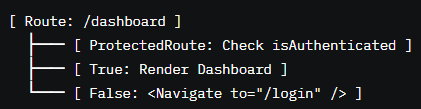
Token Storage (Cookies vs. localStorage)
Theory: Tokens (e.g., JWTs) store auth credentials, with cookies and localStorage offering different security and usability trade-offs.
- Cookies: HTTP-only cookies are secure, sent automatically with requests, but require server setup.
- localStorage: Simple, client-side storage, but vulnerable to XSS attacks.
- Storing tokens in localStorage risks XSS vulnerabilities.
- Cookies without HttpOnly or Secure flags are susceptible to attacks.
- Token expiration without refresh logic logs users out unexpectedly.
- Use HTTP-only, secure cookies for sensitive tokens (e.g., JWTs) to prevent XSS attacks and ensure secure transmission.
- Store non-sensitive data (e.g., user preferences) in localStorage for simplicity, ensuring no critical data is exposed.
- Implement token refresh mechanisms to handle expiration, maintaining seamless user sessions.
- Sanitize inputs and outputs to prevent XSS when using localStorage, enhancing security.
- Test token storage with Cypress to verify security, expiration handling, and session persistence.
- Storing tokens in localStorage without XSS protection exposes them to attacks, compromising user sessions.
- Using cookies without HttpOnly or Secure flags risks interception, reducing security.
- Failing to handle token expiration forces unexpected logouts, frustrating users.
- Neglecting to test storage mechanisms risks bugs, such as session loss or security vulnerabilities.
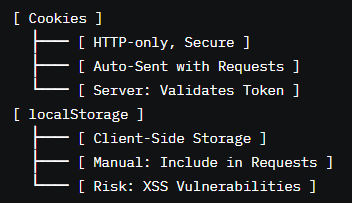
OAuth with Google, GitHub, etc.
Theory: OAuth enables secure third-party authentication (e.g., "Login with Google"), delegating auth to providers for simplified login flows.
- Use libraries like react-oauth/google or react-auth-kit.
- Redirect to provider's auth page, receive tokens on callback.
- Store tokens securely (e.g., HTTP-only cookies) and validate with backend.
- Misconfigured OAuth scopes request incorrect permissions, breaking auth.
- Token storage without security risks leaks or unauthorized access.
- Callback failures (e.g., network errors) disrupt login flows.
- Use established OAuth libraries (e.g., @react-oauth/google) for reliable integration with providers like Google or GitHub.
- Store OAuth tokens in HTTP-only cookies to prevent XSS attacks and ensure secure transmission.
- Validate OAuth tokens on the backend to ensure authenticity and prevent spoofing.
- Handle callback errors gracefully with redirect fallbacks or error messages to maintain UX.
- Test OAuth flows with Cypress to verify login, token storage, and error handling across providers.
- Misconfigured OAuth scopes cause permission errors, preventing successful logins and frustrating users.
- Storing tokens insecurely (e.g., localStorage) risks leaks via XSS, compromising user accounts.
- Unhandled callback failures (e.g., network issues) break login flows, leaving users stuck.
- Failing to test OAuth edge cases risks bugs, such as invalid tokens or provider-specific errors.
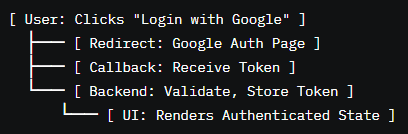
Testing
Theory: @testing-library/react tests components by simulating user interactions, focusing on behavior over implementation.
- Render components with render(<Component />).
- Query DOM with screen.getByText, screen.getByRole, etc.
- Simulate events (e.g., fireEvent.click, userEvent.click).
- Over-testing implementation details makes tests brittle.
- Missing async handling (e.g., waitFor) causes flaky tests.
- Inaccessible queries reduce test reliability.
- Test user interactions (e.g., clicks, inputs) with @testing-library/react to ensure components behave as expected.
- Use userEvent over fireEvent for realistic event simulation, improving test accuracy.
- Leverage waitFor for async operations (e.g., API calls) to handle loading states and avoid flaky tests.
- Query by accessible roles (e.g., getByRole("button")) to ensure tests align with accessibility standards.
- Mock dependencies (e.g., APIs) with MSW to isolate components and test edge cases reliably.
- Testing implementation details (e.g., internal state) makes tests brittle, breaking on refactors despite correct behavior.
- Failing to handle async operations with waitFor causes flaky tests, reducing confidence in test suites.
- Using non-accessible queries (e.g., getByTestId) reduces test robustness and accessibility alignment.
- Neglecting to mock dependencies risks unpredictable test results, especially for external APIs or services.
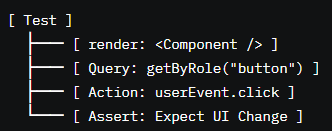
Jest for Unit Tests
Theory: Jest is a testing framework for unit tests, ideal for testing pure functions, reducers, or component logic in isolation.
- Write tests with test("description", () => { expect(result).toBe(expected); }).
- Use matchers (e.g., toBe, toEqual) for assertions.
- Mock functions or modules with jest.fn() or jest.mock.
- Over-mocking dependencies isolates tests too much, missing integration issues.
- Poor test descriptions reduce maintainability.
- Unhandled async logic causes test failures.
- Use Jest for unit testing pure functions, reducers, or utilities to ensure isolated logic works correctly.
- Write clear test descriptions (e.g., "increments counter on click") to improve maintainability and readability.
- Mock only necessary dependencies to balance isolation and realistic testing, avoiding over-mocking.
- Use async/await or waitFor for async logic to ensure reliable test execution.
- Organize tests in suites with describe to group related tests, enhancing clarity and structure.
- Over-mocking dependencies (e.g., entire modules) misses integration bugs, reducing test effectiveness.
- Vague test descriptions (e.g., "works") make debugging harder, increasing maintenance costs.
- Failing to handle async logic (e.g., promises) causes test timeouts or false positives.
- Neglecting to organize tests reduces clarity, making it harder for teams to maintain large test suites.
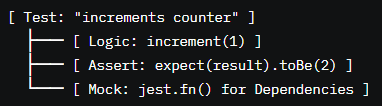
Mocking API Requests
Theory: Mocking API requests simulates server responses, isolating components for reliable, repeatable tests.
- Use MSW (Mock Service Worker) to intercept HTTP requests.
- Define mock responses (e.g., { status: 200, json: () => ({ data }) }).
- Combine with @testing-library/react for end-to-end testing.
- Inconsistent mock responses cause flaky tests.
- Over-mocking APIs misses integration issues.
- Missing error state mocks neglects edge cases.
- Use MSW to mock API requests for realistic testing without hitting real servers, ensuring consistency.
- Define varied mock responses (e.g., success, error, loading) to test all possible API states comprehensively.
- Combine mocks with @testing-library/react to simulate user interactions and verify UI updates.
- Reset mocks between tests to prevent state leakage and ensure test independence.
- Test edge cases (e.g., 404, 500 errors) to ensure components handle API failures gracefully.
- Inconsistent mock responses (e.g., changing data) cause flaky tests, reducing reliability.
- Over-mocking APIs ignores integration issues, missing bugs that appear in real-world scenarios.
- Failing to mock error states risks untested failure paths, leading to crashes in production.
- Neglecting to reset mocks between tests causes state leakage, leading to false positives or test failures.
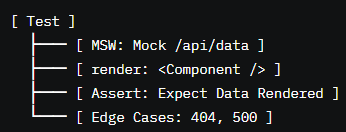
End-to-End Testing with Cypress or Playwright
Theory: End-to-end (E2E) testing with Cypress or Playwright simulates real user flows, testing the entire app from UI to backend.
- Cypress: Write tests with cy.visit, cy.get, cy.click.
- Playwright: Use browser automation with page.goto, page.locator.
- Test navigation, forms, and API integrations.
- Flaky tests from network delays require retries or timeouts.
- Missing viewport testing neglects responsive behavior.
- Overlapping E2E and unit tests wastes resources.
- Use Cypress or Playwright for E2E testing of critical user flows (e.g., login, checkout) to ensure app reliability.
- Test across multiple viewports (e.g., mobile, desktop) to verify responsive design and accessibility.
- Mock APIs with MSW in E2E tests to isolate frontend behavior and ensure consistent test results.
- Use retries or timeouts for flaky network conditions to improve test stability in real-world scenarios.
- Organize E2E tests by feature (e.g., auth, navigation) to enhance clarity and maintainability.
- Flaky tests from unhandled network delays reduce confidence in E2E suites, requiring retries or mocks.
- Neglecting responsive testing misses mobile-specific bugs, degrading UX on smaller devices.
- Overlapping E2E and unit tests wastes resources, duplicating effort without additional coverage.
- Failing to organize E2E tests makes debugging harder, increasing maintenance costs in large apps.
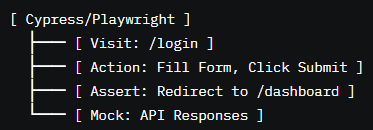
Advanced Topics
Theory: Server-Side Rendering (SSR) with Next.js renders React components on the server, improving SEO and initial load performance.
- Use getServerSideProps to fetch data server-side.
- Render components to HTML on the server, hydrate on the client.
- Integrates with React Router or Next.js routing.
- Hydration mismatches (e.g., client-server data differences) break interactivity.
- Heavy server-side logic slows response times.
- Missing static optimization loses performance benefits.
- Use Next.js for SSR in SEO-critical apps (e.g., e-commerce, blogs) to improve search engine indexing and load times.
- Fetch data in getServerSideProps to ensure server-rendered content is dynamic and up-to-date.
- Avoid hydration mismatches by ensuring client and server data align, using consistent APIs or caching.
- Optimize server-side logic with memoization or caching to reduce response times and server load.
- Test SSR with Cypress to verify server-rendered content, hydration, and client-side interactivity.
- Hydration mismatches from inconsistent data cause client-side errors, breaking interactivity and UX.
- Heavy server-side computations slow page loads, frustrating users and increasing server costs.
- Failing to leverage static optimization (e.g., getStaticProps) misses performance gains for static content.
- Neglecting to test SSR behavior risks bugs, such as hydration errors or incorrect server rendering.
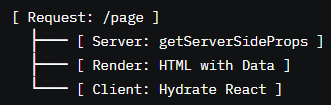
Static Site Generation
Theory: Static Site Generation (SSG) with Next.js pre-renders pages at build time, delivering static HTML for fast loads and SEO.
- Use getStaticProps for data fetching at build time.
- Use getStaticPaths for dynamic routes.
- Revalidate static pages with Incremental Static Regeneration (ISR).
- Missing getStaticPaths for dynamic routes causes 404s.
- Large static builds slow build times or consume resources.
- Stale static data requires ISR or frequent rebuilds.
- Use SSG for content-heavy sites (e.g., blogs, documentation) to deliver fast, SEO-friendly pages with minimal server load.
- Define getStaticPaths for dynamic routes to ensure all pages are pre-rendered correctly at build time.
- Leverage ISR (revalidate) to update static pages without full rebuilds, balancing freshness and performance.
- Optimize data fetching in getStaticProps with caching to reduce build times and API calls.
- Test SSG with Cypress to verify pre-rendered content, dynamic routes, and revalidation behavior.
- Omitting getStaticPaths for dynamic routes causes 404 errors, breaking navigation for users.
- Large static builds with unoptimized data fetching slow CI/CD pipelines, increasing deployment times.
- Failing to implement ISR for dynamic content results in stale pages, degrading user experience.
- Neglecting to test SSG edge cases risks bugs, such as missing routes or stale data rendering.
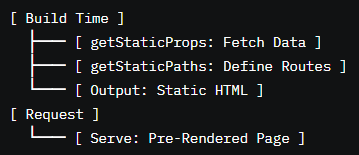
Progressive Web Apps (PWAs)
Theory: PWAs enhance React apps with offline support, push notifications, and app-like experiences using service workers.
- Use workbox or Next.js PWA plugins to register service workers.
- Cache assets for offline access (e.g., workbox.precaching).
- Add a manifest.json for app metadata (e.g., icons, name).
- Incorrect caching strategies cause stale assets or broken offline mode.
- Missing manifest metadata prevents installability on mobile.
- Service worker updates require careful cache invalidation.
- Use workbox or Next.js PWA plugins to simplify service worker setup and enable offline support.
- Cache critical assets (e.g., HTML, CSS, JS) for offline access, ensuring a reliable user experience.
- Include a complete manifest.json with icons, name, and theme colors to support app installation.
- Implement cache invalidation strategies (e.g., workbox.staleWhileRevalidate) to ensure fresh content.
- Test PWA features with Lighthouse and Cypress to verify offline behavior, installability, and performance.
- Incorrect caching (e.g., over-caching dynamic assets) serves stale content, breaking functionality.
- Incomplete manifest.json prevents PWA installation, limiting app-like features on mobile.
- Failing to update service workers causes outdated assets, leading to broken offline experiences.
- Neglecting to test PWA features risks bugs, such as offline failures or installability issues.
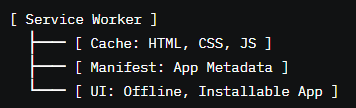
Integrating with WebSockets or Firebase
Theory: WebSockets and Firebase enable real-time features (e.g., chat, notifications) by maintaining persistent connections or syncing data.
- WebSockets: Use socket.io or ws for bi-directional communication.
- Firebase: Use Firestore or Realtime Database for data syncing.
- Integrate with useEffect for connection setup/cleanup.
- Unclosed WebSocket connections cause memory leaks.
- Firebase subscription overuse increases costs or quotas.
- Missing error handling for connection failures breaks UX.
- Use WebSockets (socket.io) for low-latency, real-time features like chat or live updates, ensuring robust connections.
- Leverage Firebase Firestore for scalable, real-time data syncing in apps like dashboards or collaborative tools.
- Clean up WebSocket or Firebase subscriptions in useEffect cleanup to prevent memory leaks on unmount.
- Handle connection errors with fallback UIs (e.g., "Reconnecting...") to maintain UX during failures.
- Test real-time features with Cypress to verify connection, data syncing, and error handling.
- Unclosed WebSocket connections on unmount cause memory leaks, degrading app performance.
- Overusing Firebase subscriptions hits quotas or increases costs, requiring optimized queries.
- Failing to handle connection errors leaves users without feedback, degrading real-time UX.
- Neglecting to test real-time edge cases risks bugs, such as dropped connections or stale data.
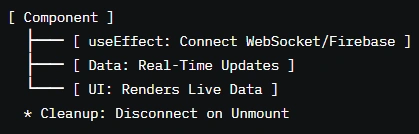
React Native Basics
Theory: React Native uses React principles to build native mobile apps for iOS and Android, sharing logic with web apps.
- Use components like <View>, <Text> instead of <div>, <p>.
- Style with StyleSheet.create for platform-specific styling.
- Integrate with native modules for device features (e.g., camera).
- Platform-specific differences (e.g., iOS vs. Android) require conditional logic.
- Performance issues arise from heavy animations or large lists.
- Native module integration requires careful setup.
- Reuse React logic (e.g., Hooks, state) in React Native to share code between web and mobile apps.
- Use StyleSheet.create for performant, platform-specific styling, ensuring consistent UX across devices.
- Handle platform differences with Platform.OS checks to adapt behavior for iOS and Android.
- Optimize performance with FlatList for large lists and minimal animations to ensure smooth rendering.
- Test React Native apps with Detox or Appium to verify UI, interactions, and platform-specific behavior.
- Ignoring platform differences causes inconsistent UX or errors, such as iOS-specific styling breaking on Android.
- Heavy animations or unoptimized lists slow performance, degrading mobile app responsiveness.
- Incorrect native module setup causes crashes or missing features, requiring careful configuration.
- Failing to test on both platforms risks platform-specific bugs, reducing app reliability.
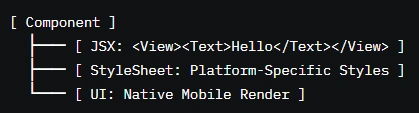
Development Tools
Theory: ESLint enforces code quality, and Prettier formats code consistently, improving readability and reducing errors.
- Install eslint, prettier, and plugins (e.g., eslint-plugin-react).
- Configure .eslintrc.json and .prettierrc for rules.
- Integrate with VS Code or CI/CD for automatic linting/formatting.
- Conflicting ESLint/Prettier rules cause formatting loops.
- Missing IDE integration reduces developer efficiency.
- Overly strict rules slow development without benefits.
- Configure ESLint with eslint-plugin-react and eslint-plugin-react-hooks to catch React-specific errors early.
- Use Prettier for consistent formatting (e.g., single quotes, 2-space indentation) to improve team collaboration.
- Integrate ESLint/Prettier with VS Code extensions for real-time feedback, speeding up development.
- Run linting/formatting in CI/CD pipelines to enforce code quality across commits.
- Test linting rules with Jest to verify custom rules and ensure error-free codebases.
- Conflicting ESLint/Prettier rules cause infinite formatting loops, frustrating developers.
- Failing to integrate with IDEs reduces adoption, leading to inconsistent code quality.
- Overly strict linting rules slow development, requiring balanced configurations.
- Neglecting to test linting rules risks enforcing incorrect or overly restrictive rules.
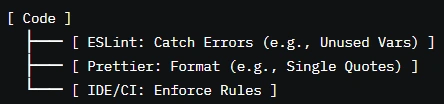
VS Code Extensions
Theory: VS Code extensions enhance React development with linting, formatting, debugging, and autocompletion.
- Install extensions like ESLint, Prettier, React Snippets, and GitLens.
- Configure settings for auto-formatting or snippet suggestions.
- Use built-in debugging for React apps.
- Overlapping extensions cause conflicts (e.g., multiple formatters).
- Outdated extensions introduce bugs or incompatibilities.
- Missing configuration reduces extension effectiveness.
- Install key extensions (e.g., ESLint, Prettier, React Snippets) to streamline React development and improve productivity.
- Configure auto-formatting on save to ensure consistent code style without manual intervention.
- Use GitLens for version control insights to enhance collaboration and code review processes.
- Keep extensions updated to avoid bugs and ensure compatibility with the latest React versions.
- Test extension behavior in VS Code to verify linting, formatting, and snippet functionality.
- Overlapping extensions (e.g., multiple linters) cause conflicts, leading to inconsistent formatting or errors.
- Outdated extensions break with new React or JavaScript features, reducing development efficiency.
- Failing to configure extensions properly limits their benefits, requiring manual fixes.
- Neglecting to test extensions risks workflow disruptions, such as broken linting or formatting.
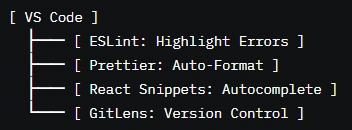
Browser DevTools for React
Theory: Browser DevTools (e.g., Chrome DevTools) debug React apps by inspecting the DOM, network, and performance.
- Inspect DOM and styles in the Elements tab.
- Monitor network requests in the Network tab.
- Profile performance with the Performance tab.
- Missing source maps make debugging minified code difficult.
- Overlooking performance bottlenecks slows app responsiveness.
- Incorrect network monitoring misses API issues.
- Use Chrome DevTools to inspect React's virtual DOM and component props via the React Developer Tools extension.
- Monitor network requests to debug API calls, ensuring correct data fetching and error handling.
- Profile performance to identify bottlenecks (e.g., slow renders, heavy computations) and optimize accordingly.
- Enable source maps in development for readable stack traces, simplifying debugging.
- Test DevTools workflows with real-world scenarios to verify debugging effectiveness.
- Missing source maps complicates debugging minified code, slowing issue resolution.
- Ignoring performance profiling misses optimization opportunities, degrading app performance.
- Failing to monitor network requests overlooks API errors, leading to broken functionality.
- Neglecting React Developer Tools reduces insight into component state and props, complicating debugging.
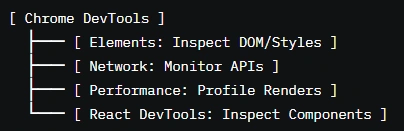
Using React DevTools
Theory: React DevTools is a browser extension for inspecting component hierarchies, props, state, and performance in React apps.
- Install React DevTools for Chrome or Firefox.
- View component tree, props, and state in the Components tab.
- Profile renders in the Profiler tab to optimize performance.
- Large component trees slow DevTools performance.
- Missing DevTools in production reduces debugging capabilities.
- Incorrect profiling misses optimization opportunities.
- Use React DevTools to inspect component hierarchies, props, and state for rapid debugging and development.
- Profile renders with the Profiler tab to identify slow components or unnecessary re-renders.
- Filter components in large apps to focus on specific parts of the hierarchy, improving debugging efficiency.
- Enable DevTools in development mode only to avoid exposing internal state in production.
- Test DevTools workflows to verify component inspection and profiling accuracy.
- Large component trees in DevTools slow debugging, requiring filtering or simplified hierarchies.
- Enabling DevTools in production risks exposing sensitive state or props to users.
- Failing to profile renders misses optimization opportunities, leading to slow UIs.
- Neglecting to test DevTools usage reduces debugging effectiveness in complex apps.
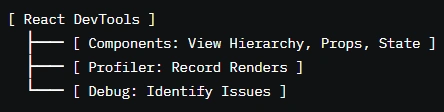
GitHub Copilot / AI Code Tools
Theory: AI code tools like GitHub Copilot assist with code completion, suggesting React patterns, and debugging.
- Install Copilot in VS Code for real-time code suggestions.
- Use for boilerplate, Hooks, or component patterns.
- Review AI suggestions to ensure accuracy and security.
- Incorrect AI suggestions introduce bugs or inefficiencies.
- Over-reliance on AI reduces learning and code understanding.
- Sensitive data in code risks exposure via AI tools.
- Use GitHub Copilot for repetitive tasks (e.g., component boilerplate) to speed up development and reduce errors.
- Review AI suggestions carefully to ensure they align with React best practices and project requirements.
- Avoid using AI tools for sensitive code (e.g., auth logic) to prevent data exposure or security risks.
- Combine AI tools with ESLint and TypeScript to catch errors in generated code, ensuring quality.
- Test AI-generated code with Jest or React Testing Library to verify functionality and correctness.
- Blindly accepting AI suggestions introduces bugs or suboptimal patterns, reducing code quality.
- Over-reliance on AI tools hinders learning core React concepts, limiting developer growth.
- Including sensitive data in AI-processed code risks leaks, especially in public repositories.
- Failing to test AI-generated code risks bugs, as suggestions may not handle edge cases correctly.
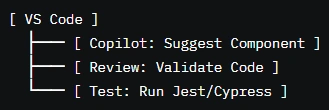
Roadmap to MERN Mastery
To become a MERN (MongoDB, Express.js, React, Node.js) pro, follow this roadmap, building on the React foundation above:
- Variables, functions, objects, arrays, async/await, promises, ES6+ syntax.
- Practice with tools like freeCodeCamp or LeetCode.
- Build projects (e.g., todo app, e-commerce site) using Hooks, Router, and state management.
- Explore Next.js for SSR/SSG and React Native for mobile apps.
- Use testing libraries (Jest, Cypress) for robust apps.
- Build REST APIs with Express.js (e.g., CRUD endpoints).
- Handle middleware, authentication, and error handling.
- Use Postman to test APIs.
- Learn NoSQL concepts, schema design, and Mongoose ORM.
- Integrate MongoDB with Express.js for data storage.
- Practice queries and indexing for performance.
- Combine React frontend with Express.js/Node.js backend and MongoDB.
- Example projects: social media app, blog platform, or e-commerce site.
- Deploy with Vercel (frontend) and Heroku/AWS (backend).
- Implement WebSockets for real-time features.
- Optimize performance with caching (e.g., Redis) and load balancing.
- Secure apps with JWT, OAuth, and input validation.
- Join open-source MERN projects on GitHub.
- Network with developers via X or meetups.
- Stay updated with React, Node.js, and MongoDB releases.
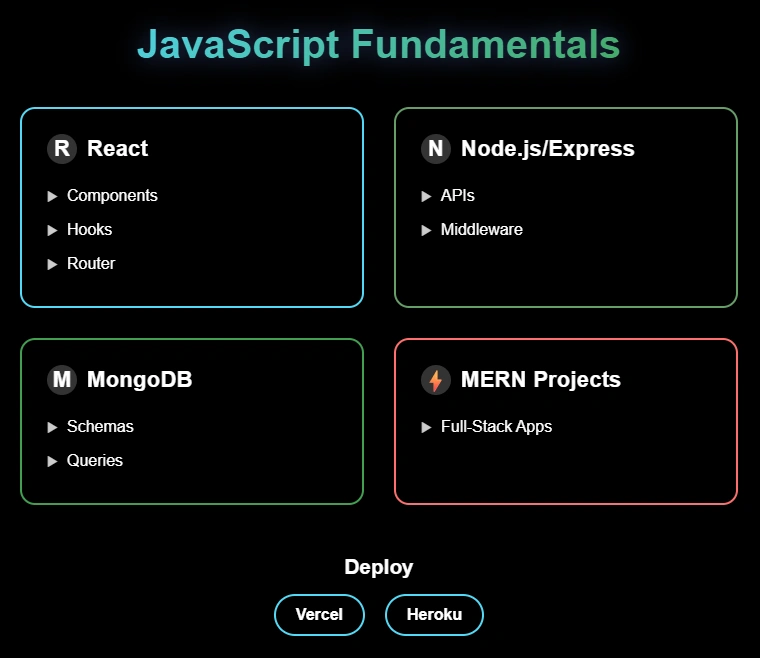
Conclusion: Your Galactic React Journey
This guide is your cosmic command hub, equipping you to conquer React’s universe with unmatched confidence. From core concepts to advanced patterns, you’ve explored every facet of React—JSX, components, Hooks, routing, styling, state management, data fetching, performance, authentication, testing, and tools—woven into a mentorship-driven narrative with vivid analogies and diagrams. Whether you’re a non-coder building your first toy city or a seasoned architect crafting enterprise-grade systems, this resource is your definitive foundation. Now, launch into the MERN galaxy, build transformative applications, and make history as a React master!
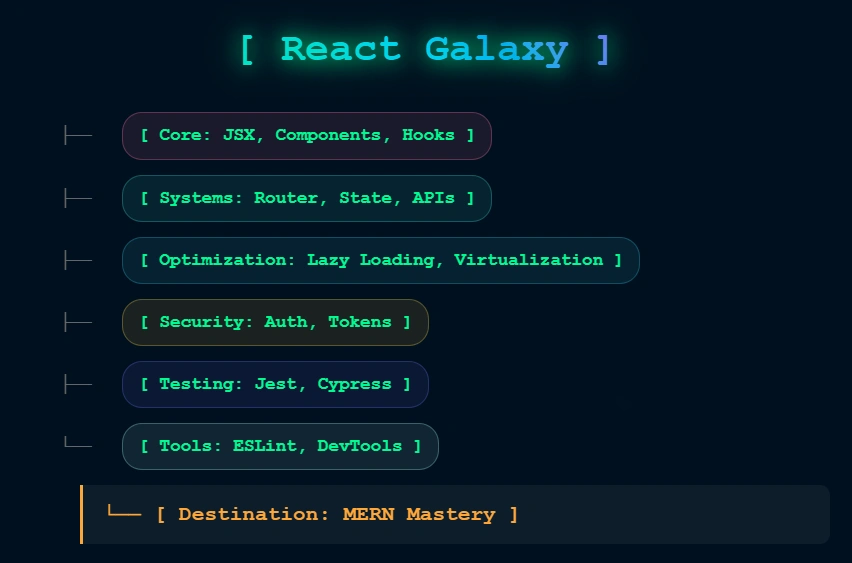
Your React Mastery Journey
Navigate the cosmic odyssey from React fundamentals to MERN mastery. Master JSX, Hooks, routing, styling, state management, and advanced patterns through our structured galactic expedition.
React Fundamentals
Launch into the React universe
Understand React’s core: JSX for declarative UIs, functional vs. class components, and props for data flow. Build a solid foundation with beginner-friendly explanations.
Hooks Introduction
Unlock dynamic behavior
Dive into Hooks: master useState for state management and useEffect for side effects. Learn how Hooks simplify functional components with practical examples.
Routing & Navigation
Navigate with React Router
Set up React Router for dynamic and nested routes. Implement lazy loading and protected routes to create seamless single-page application navigation.
Styling in React
Style your components
Explore Tailwind CSS, styled-components, and Emotion for modern styling. Learn inline styles and best practices for scalable, maintainable CSS in React.
Data Fetching & APIs
Connect to APIs
Fetch data with useEffect, handle loading/error states, and optimize with SWR or React Query. Implement debouncing, pagination, and infinite scrolling.
State Management
Manage complex state
Compare useState, useReducer, Redux Toolkit, and Recoil. Learn scalable state management patterns for handling complex application data.
React Interview Prep
Ace React interviews
Tackle React-specific interview questions and coding challenges on Hooks, routing, state management, and performance optimization.
Build React Projects
Apply your skills
Develop real-world apps like dashboards or e-commerce platforms. Combine Hooks, routing, styling, and data fetching for production-ready projects.
Understanding useState
Master component state
Master the useState hook in React to manage component state efficiently. Learn how to declare state variables, update values dynamically, and use state effectively to build interactive UIs.